Authentication Policy
This page was previously named Two-Factor Authentication in the app’s sidebar. The URL and everything on the page are unchanged — only the nav label was renamed.
Two-factor authentication (2FA) adds a second layer of security on top of a password — after signing in, a user must also confirm their identity with a one-time code from an authenticator app. This page lets you check your own 2FA status and, if you’re a workspace admin, decide whether 2FA is required for everyone in the workspace.
What you can do here:
- Check your own two-factor status (on or off) and, once enrolled, your trusted devices and recovery codes
- Turn on workspace enforcement so every member must enrol in 2FA
- Set a grace period that gives members time to enrol before they lose access
- See how many members have already enrolled and how many would be impacted
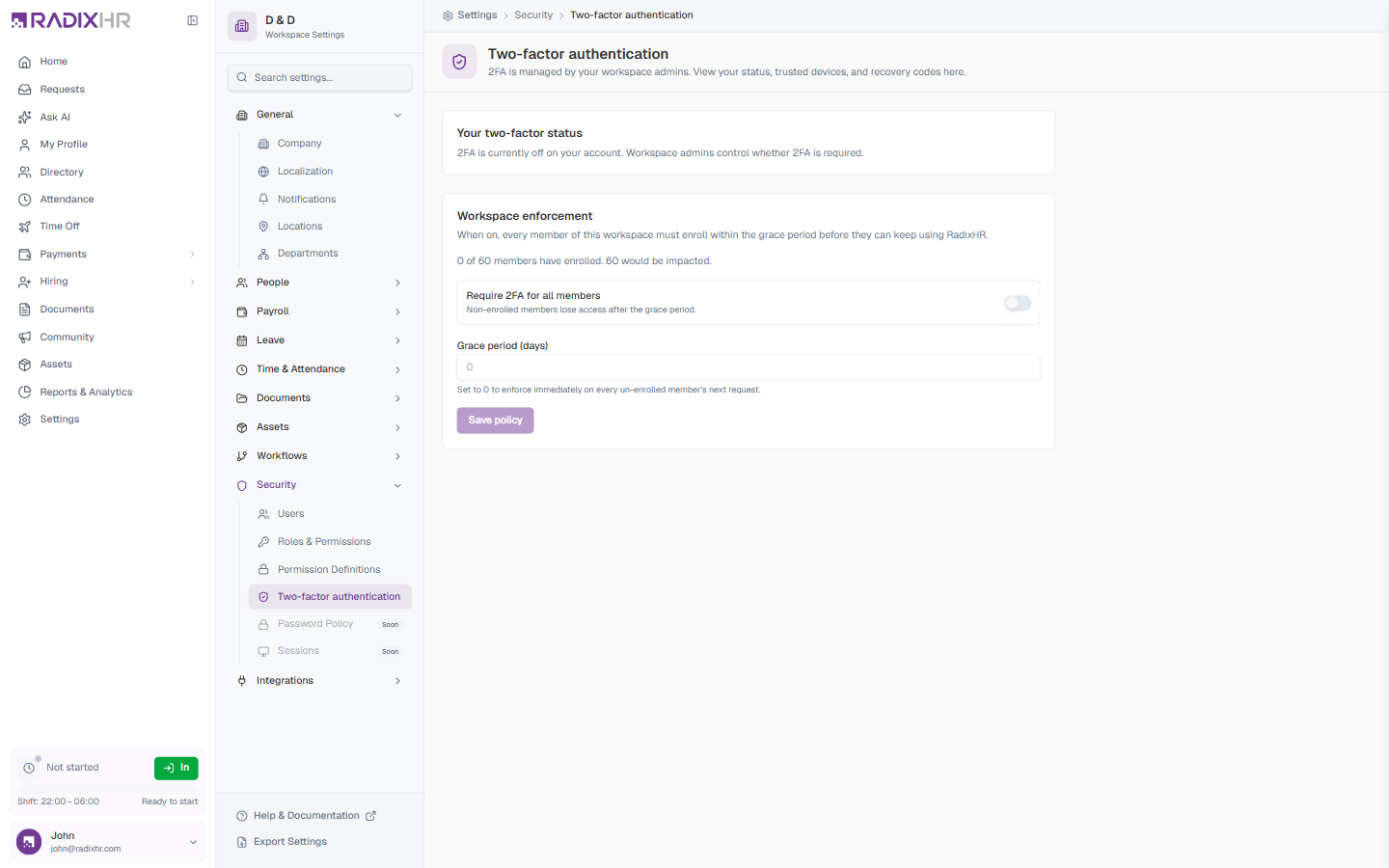
2FA is managed by your workspace admins. Individual members can view their own status, trusted devices, and recovery codes here, but whether 2FA is required is controlled by the workspace enforcement policy below.
Your Two-Factor Status
The Your two-factor status card shows the state of 2FA on your own account:
- When 2FA is off, you’ll see “2FA is currently off on your account. Workspace admins control whether 2FA is required.”
- Once you’ve enrolled, this card also surfaces your trusted devices (devices you’ve marked so they don’t prompt for a code every time) and your recovery codes (one-time backup codes for when you can’t reach your authenticator app).
Save your recovery codes somewhere safe when you enrol. They’re the only way back into your account if you lose access to your authenticator device.
Workspace Enforcement
The Workspace enforcement card is where admins decide whether 2FA is mandatory for the whole workspace. When enforcement is on, every member must enrol within the grace period before they can keep using RadixHR.
A live counter shows the current impact — for example, “0 of 60 members have enrolled. 60 would be impacted.” — so you can see how many people the policy affects before you turn it on.
Policy Fields
| Field | Description | Required |
|---|---|---|
| Require 2FA for all members | Master toggle for the policy. ON: every member must enrol; non-enrolled members lose access after the grace period. OFF: 2FA is optional and left to each member. | Yes |
| Grace period (days) | How long members have to enrol after the policy is turned on, before they’re locked out. Set to 0 to enforce immediately on every un-enrolled member’s next request. | Yes |
After changing the toggle or grace period, click Save policy to apply the change.
Turning on enforcement with a grace period of 0 locks out every member who hasn’t already enrolled the next time they try to use RadixHR. Give people a reasonable grace period (and a heads-up) before enforcing, so nobody is caught out mid-task.
Announce the change first, set a grace period of a few days, and watch the “X of Y members have enrolled” counter climb before the deadline. Once most people have enrolled, the remaining stragglers are easy to follow up with individually.