Payment Methods
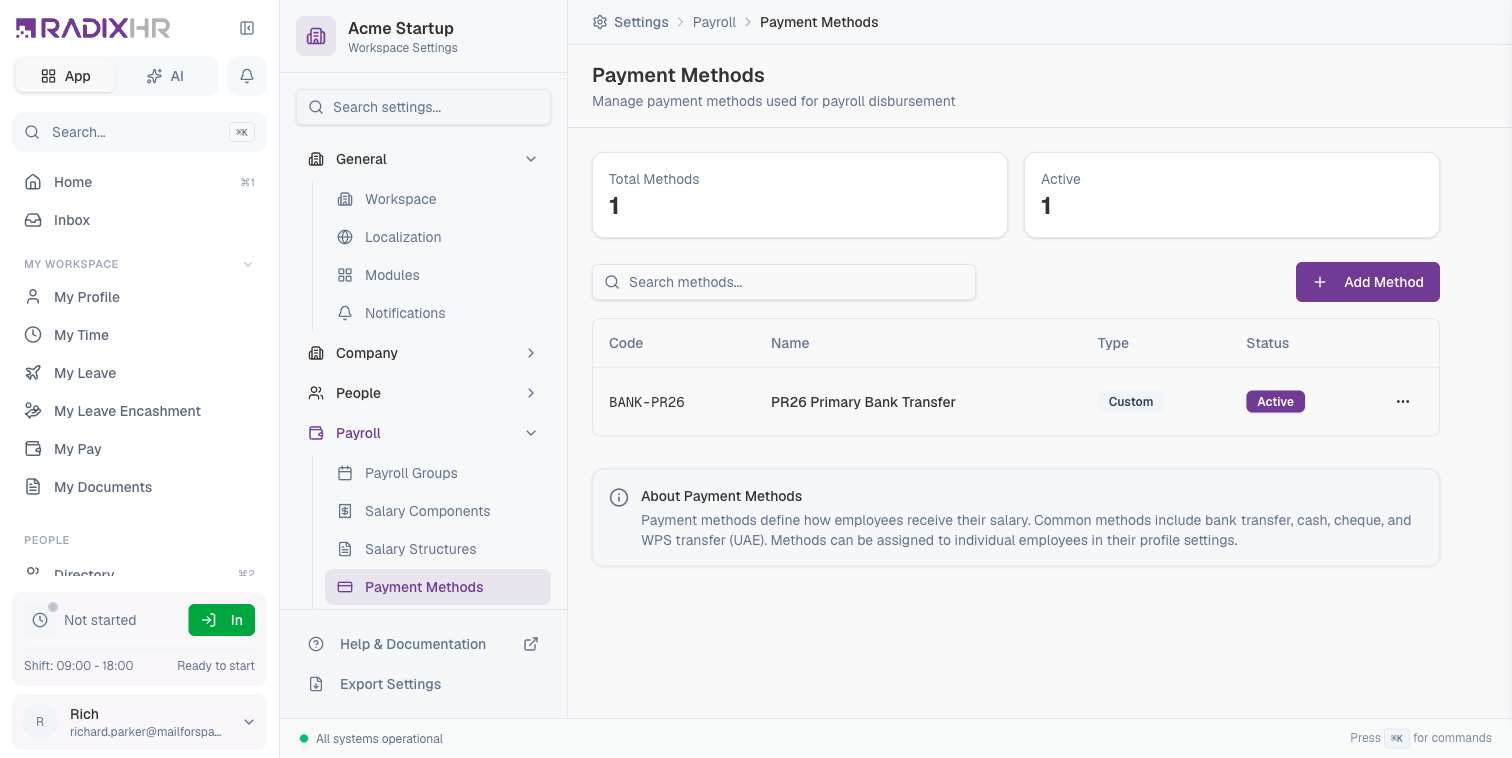
Payment Methods define how employees receive their salary. Each method represents a disbursement channel like bank transfer, cash, cheque, or regional payment systems like WPS (Wage Protection System).
What you can do here:
- Create and manage payment methods
- Activate or deactivate methods as needed
- Assign default methods to employees
- Support multiple disbursement channels
Why Use Payment Methods?
Payment methods provide flexibility in how you disburse salaries:
- Multiple Channels: Support bank transfers, cash, cheques, and digital wallets
- Regional Compliance: Use mandated systems like WPS in the UAE
- Employee Choice: Allow employees to receive pay through their preferred method
- Audit Trail: Track which method was used for each payment
- Flexibility: Different employees can use different payment methods
Payment methods are assigned to individual employees in their profile settings. When running payroll, the system uses each employee’s assigned payment method to process their disbursement.
The Summary Cards (Total Methods / Active) that used to sit above the table are gone — the page now goes straight from the header/toolbar to the table, followed by an About Payment Methods info box at the bottom.
Method Properties
| Column | Description |
|---|---|
| Code | Unique identifier for the payment method |
| Name | Display name describing the method |
| Type | Category of payment method (Bank, Cash, Custom, etc.) |
| Status | Active or Inactive |
Creating a Payment Method
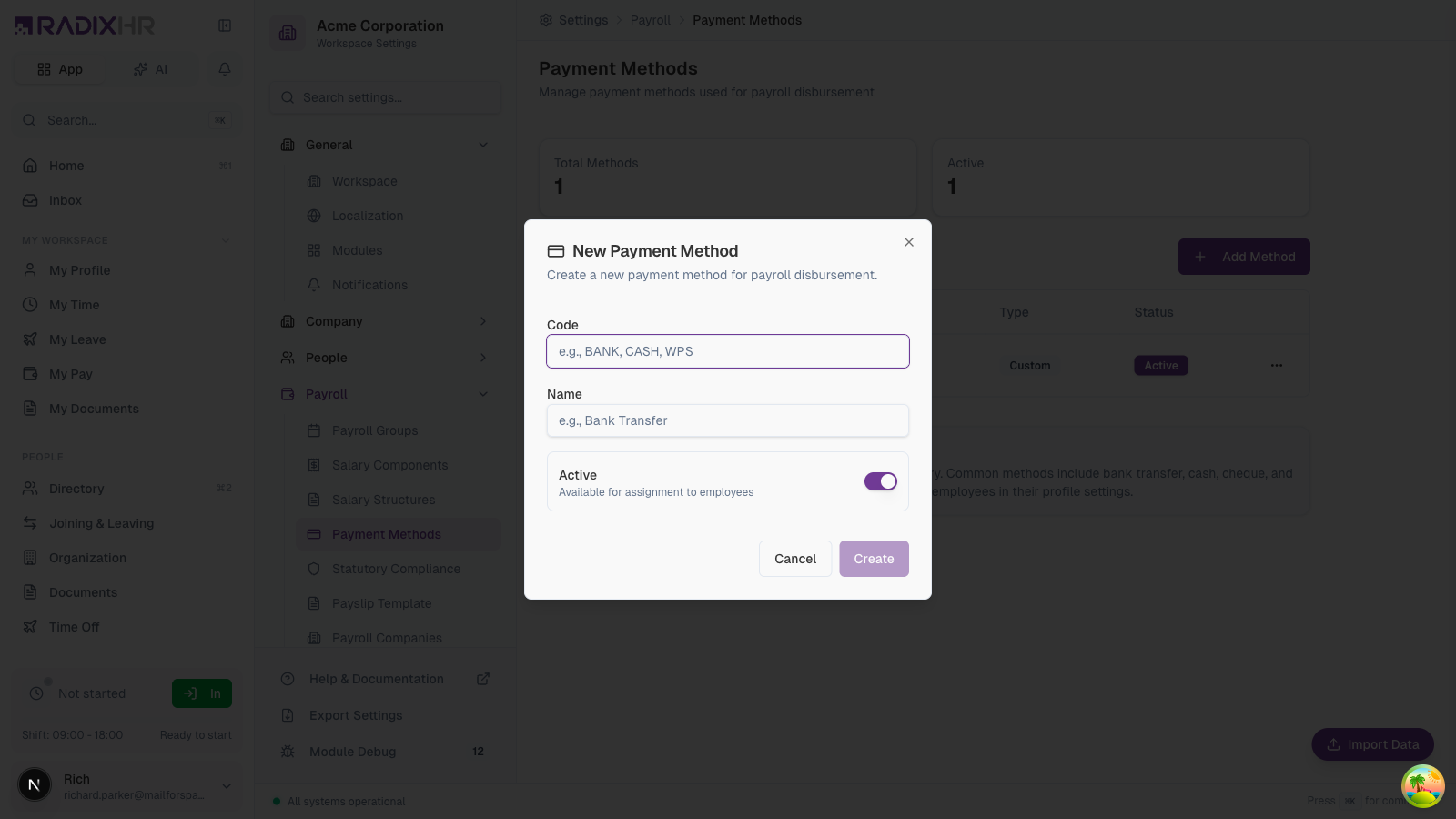
- Click Add Method
- Enter the method code
- Provide a descriptive name
- Set the active status
- Click Create
Method Fields
| Field | Description | Required |
|---|---|---|
| Code | Unique identifier (e.g., BANK, CASH, WPS) | Yes |
| Name | Display name (e.g., Bank Transfer, Cash Payment) | Yes |
| Active | Whether method is available for assignment | Yes |
Common Payment Methods
| Method | Code | Description | Use Case |
|---|---|---|---|
| Bank Transfer | BANK | Direct deposit to employee’s bank account | Most common method for salaried employees |
| Cash | CASH | Physical cash payment | Small businesses, temporary workers |
| Cheque | CHEQUE | Paper cheque issued to employee | Legacy systems, specific requirements |
| WPS Transfer | WPS | UAE Wage Protection System | Mandatory for UAE-based companies |
| Digital Wallet | WALLET | Mobile money or e-wallet | Regions with limited banking access |
Create a separate payment method for each disbursement channel you use. This provides better tracking and reporting capabilities.
Regional Payment Systems
WPS (Wage Protection System) - UAE
The Wage Protection System is mandatory for companies in the UAE:
| Requirement | Description |
|---|---|
| Mandate | All UAE employers must pay through WPS |
| Bank Integration | Requires registration with an approved agent bank |
| Reporting | Automatic submission to Ministry of Labour |
| Format | Specific file format for salary information |
If operating in the UAE, ensure you have a WPS payment method configured and properly integrated with your agent bank.
Other Regional Systems
| Region | System | Description |
|---|---|---|
| Saudi Arabia | GOSI/Mudad | Integrated with social insurance |
| India | UPI/NEFT | Bank transfer systems |
| Philippines | GCash/Maya | Popular digital wallets |
Managing Payment Methods
Editing a Method
- Find the method in the list
- Click the menu button (…)
- Select Edit
- Modify the name or status
- Save changes
Deactivating a Method
To prevent a method from being assigned to new employees:
- Click the menu button (…)
- Select Edit
- Toggle Active off
- Save changes
Deactivating a method doesn’t affect employees already using it. Their existing assignments remain until you change their individual settings.
Assigning to Employees
Payment methods are assigned in the employee profile:
- Go to the employee’s profile
- Navigate to Pay or Salary section
- Select the payment method
- Save the profile
Set up a default payment method to automatically assign to new employees during onboarding.
Best Practices
- Use clear codes: Choose descriptive codes like BANK-USD or WPS-AED
- Keep names specific: Include details like “Primary Bank Transfer” or “Cash - Weekly Workers”
- Audit regularly: Review active methods and deactivate unused ones
- Document requirements: Note any special setup needed for regional systems
- Test before using: Verify integrations work before running actual payroll
Integration Considerations
| Integration | Description |
|---|---|
| Bank Files | Some methods require generating specific file formats for banks |
| API Connections | Digital wallets may require API integration |
| Compliance Reports | Regional systems often require specific reporting formats |
How This Actually Works
- A Payment Method here only stores a channel type — a code, a name, and an active flag. It holds no bank details at all, so creating or editing a method never touches anyone’s account number or IBAN.
- The actual bank account lives on the employee, in a separate place. Each employee has their own Bank Details tab (under their profile’s Compensation section) with IBAN, account number, SWIFT/routing code, and currency — this is a different screen from where their Payment Method is assigned (Settings → Pay on their profile), even though both feel like “how this person gets paid.”
- Employee bank accounts go through an approval workflow: Draft → Pending Approval → Approved/Rejected, and someone other than the employee (their manager, HR Admin, or the workspace owner) has to approve it. Once approved, the record locks — it must be explicitly Unlocked before any field can be edited again.
- Payroll readiness checks Payment Method and Bank Account separately, and unconditionally. Assigning “Cash” or “Cheque” as the payment method does not exempt an employee from the “Bank Account” readiness check — the system still looks for a primary bank account on file and will flag it missing even when the employee will never be paid via bank transfer.
If a cash- or cheque-paid employee shows an incomplete payroll readiness checklist, check whether the gap is the Bank Account item specifically — it’s checked regardless of which payment method the employee actually uses.
Common Scenarios
“We pay some staff in cash and others by bank transfer — can I do both in the same payroll run?” Yes — payment methods are assigned per employee on their own profile, not per payroll run. Create both a Bank Transfer and a Cash method here, assign each employee whichever applies to them, and a single payroll run disburses each person through their own assigned method — there’s no need to split them into separate runs by method.