Salary Components
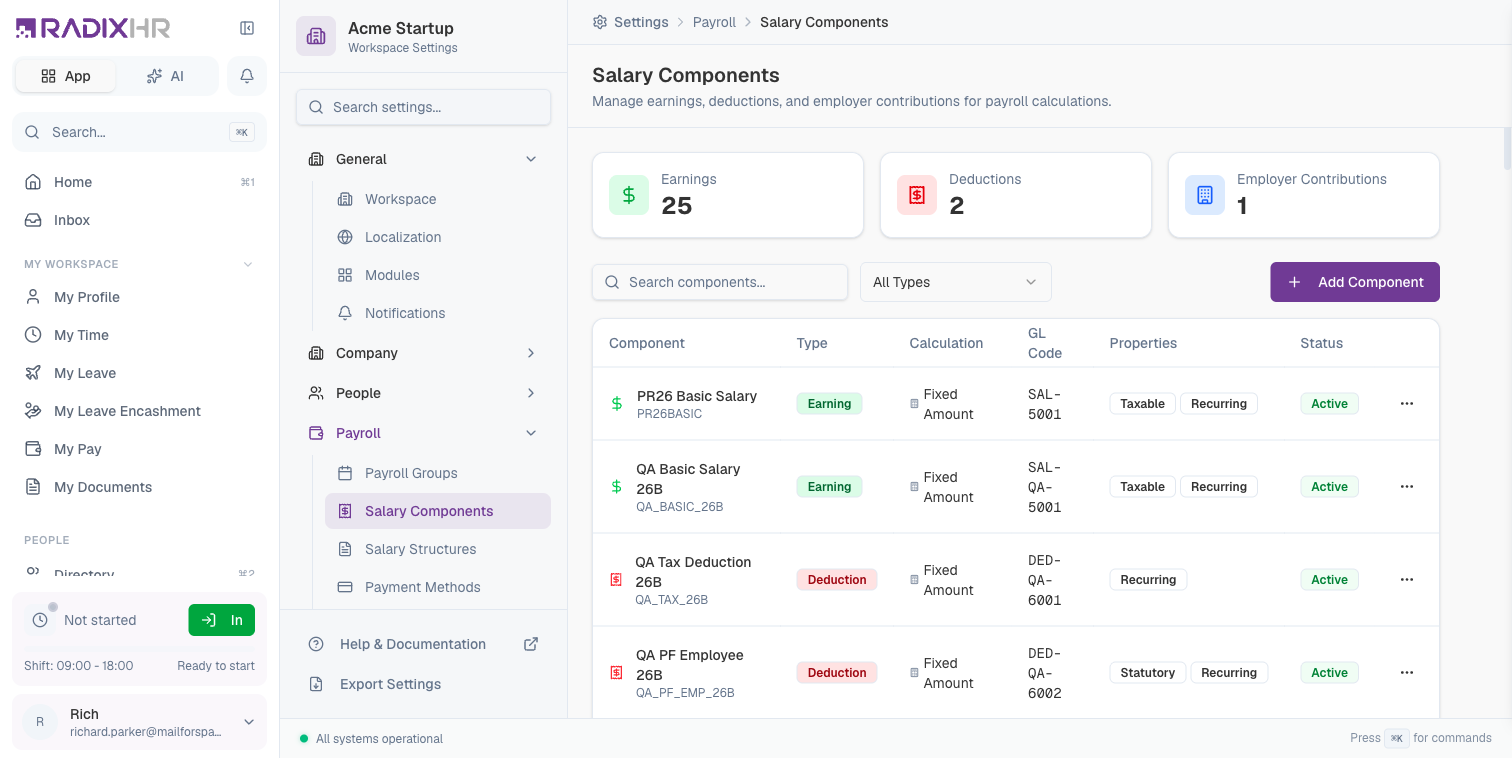
Salary Components are the building blocks of employee compensation. They define individual elements that make up an employee’s salary, including earnings (additions), deductions (subtractions), and employer contributions.
What you can do here:
- Create and manage salary components
- Define calculation methods (fixed, percentage, formula)
- Set tax and statutory properties
- Configure GL codes for accounting integration
Why Use Salary Components?
Salary components provide a structured way to:
- Break Down Compensation: Separate salary into meaningful parts (basic, allowances, bonuses)
- Handle Compliance: Mark components as statutory for government-mandated contributions
- Tax Calculations: Identify which components are taxable vs tax-exempt
- Accounting Integration: Map components to GL codes for seamless financial reporting
- Payslip Clarity: Show employees exactly how their pay is calculated
Salary components are used in salary structures, which define how employee compensation packages are assembled. Create your components first, then combine them into structures.
Component Types
There are three types of salary components, each serving a different purpose:
| Type | Description | Effect on Pay | Examples |
|---|---|---|---|
| Earning | Additions to employee salary | Increases take-home pay | Basic Salary, HRA, Allowances, Bonuses |
| Deduction | Subtractions from employee salary | Decreases take-home pay | Tax, PF Employee, Loan Repayment |
| Employer Contribution | Employer-paid benefits (not deducted from employee) | No effect on take-home pay | PF Employer Share, Gratuity, Insurance |
Earnings
Earnings are components that add to an employee’s salary:
- Basic Salary (foundation of compensation)
- House Rent Allowance (HRA)
- Dearness Allowance (DA)
- Conveyance Allowance
- Medical Allowance
- Performance Bonuses
- Overtime Pay
Deductions
Deductions are components that subtract from an employee’s gross pay:
- Income Tax (TDS)
- Provident Fund (Employee Share)
- Professional Tax
- Loan Repayments
- Salary Advances Recovery
- Insurance Premiums
Employer Contributions
Employer contributions are amounts the company pays on behalf of the employee:
- Provident Fund (Employer Share)
- Gratuity Fund
- Health Insurance (Company-Paid)
- Pension Contributions
Employer contributions don’t reduce the employee’s take-home pay but are still part of the total compensation cost (CTC - Cost to Company).
The Summary Cards (Earnings / Deductions / Employer Contributions counts) that used to sit above the table are gone — the page now goes straight from the header/toolbar to the table.
Component Properties
| Column | Description |
|---|---|
| Component | Name and code of the salary component |
| Type | Earning, Deduction, or Employer Contribution |
| Calculation | How the amount is calculated (Fixed, Percentage, Formula) |
| GL Code | General ledger account for accounting |
| Properties | Tags showing component characteristics (Taxable, Statutory, Recurring) |
| Status | Active or Inactive |
Creating a Salary Component
- Click Add Component
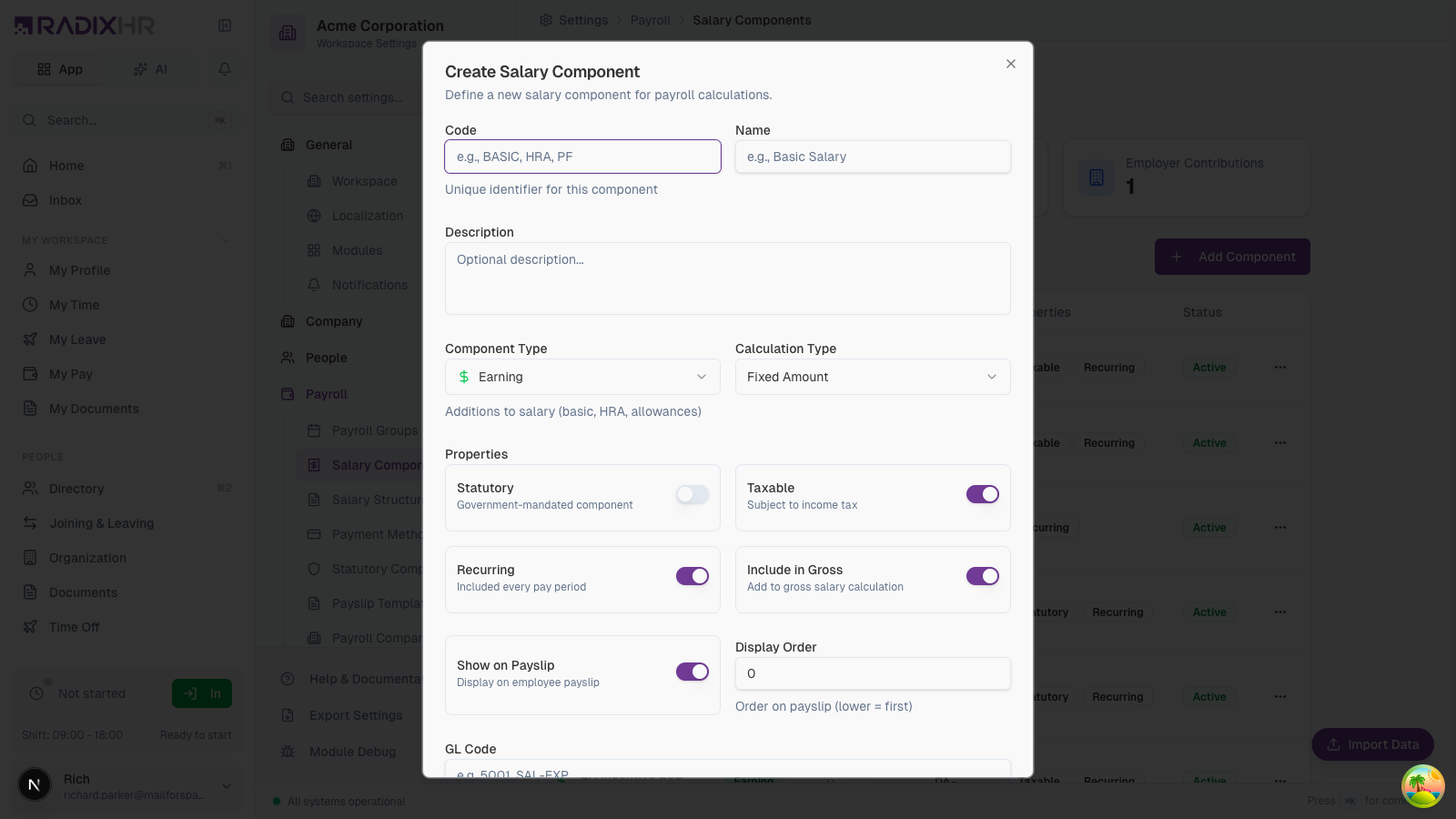
- Enter the component code and name
- Select the component type
- Choose the calculation method
- Set properties (taxable, recurring, etc.)
- Add GL code if needed
- Click Create Component
Basic Fields
| Field | Description | Required |
|---|---|---|
| Code | Unique identifier (e.g., BASIC, HRA, PF_EMP) | Yes |
| Name | Display name (e.g., Basic Salary, House Rent Allowance) | Yes |
| Description | Optional explanation of the component | No |
Type and Calculation
| Field | Options | Description |
|---|---|---|
| Component Type | Earning, Deduction, Employer | Determines if component adds or subtracts from pay |
| Calculation Type | Fixed Amount, plus a range of percentage, formula, and slab methods (see below) | How the component’s value is computed |
Calculation Types
RadixHR offers several calculation methods — pick the one that matches how the component should be worked out:
| Type | How it’s calculated |
|---|---|
| Fixed Amount | A specific amount (set in the salary structure). Best for basic salary and flat allowances. |
| % of Basic | A percentage of Basic Salary. |
| % of Gross | A percentage of gross salary. |
| % of CTC | A percentage of total Cost to Company. |
| % of Component | A percentage of another component you choose (the base component is picked in the salary structure). |
| % with Cap | A percentage of a base, limited by minimum/maximum cap amounts (the caps are set in the salary structure). |
| % if Eligible | A percentage that applies only when the employee meets an eligibility condition. |
| Remainder of CTC | A balancing component — takes whatever is left of CTC after all other components are calculated. |
| Slab Based | A fixed amount that changes with the employee’s salary slab (like Professional Tax brackets); the slabs are set in the salary structure. |
| Custom Formula | A custom calculation written as a JavaScript expression in a Calculation Script box, using variables such as salary.basic, salary.gross, salary.ctc, employee.*, and period.*. |
When you pick a percentage method, the form shows a Default Percentage field; the actual base component, caps, and slabs are configured per salary structure. Custom Formula shows a Calculation Script editor instead.
Properties
| Property | Description | Default |
|---|---|---|
| Statutory | Government-mandated component (PF, ESI, Tax) | Off |
| Taxable | Subject to income tax calculations | On |
| Recurring | Included in every pay period automatically | On |
| Include in Gross | Added to gross salary calculation | On |
Be careful when setting the Statutory flag. Statutory components are typically regulated by law and may have specific calculation rules and limits.
Payslip Settings
| Setting | Description |
|---|---|
| Show on Payslip | Whether to display this component on employee payslips |
| Display Order | Order in which component appears on payslip (lower numbers first) |
Accounting Integration
| Field | Description |
|---|---|
| GL Code | General ledger account code for your accounting system (e.g., 5001, SAL-EXP) |
GL codes help integrate payroll with your accounting software. Consult your finance team for the correct account codes.
Common Salary Components
Standard Earnings
| Component | Code | Taxable | Recurring | Description |
|---|---|---|---|---|
| Basic Salary | BASIC | Yes | Yes | Foundation of all compensation |
| House Rent Allowance | HRA | Partially | Yes | Tax benefit for rent expenses |
| Dearness Allowance | DA | Yes | Yes | Cost of living adjustment |
| Conveyance Allowance | CONV | No (up to limit) | Yes | Travel to work |
| Special Allowance | SPECIAL | Yes | Yes | Flexible component |
Standard Deductions
| Component | Code | Statutory | Description |
|---|---|---|---|
| Provident Fund (Employee) | PF_EMP | Yes | Employee’s PF contribution |
| Professional Tax | PT | Yes | State-level tax |
| Income Tax (TDS) | TDS | Yes | Tax deducted at source |
| Loan Recovery | LOAN | No | Salary advance repayment |
Employer Contributions
| Component | Code | Statutory | Description |
|---|---|---|---|
| Provident Fund (Employer) | PF_ER | Yes | Company’s PF contribution |
| Gratuity | GRATUITY | Yes | Long-term benefit |
| ESI (Employer) | ESI_ER | Yes | Employee State Insurance |
Filtering Components
Use the filter dropdown to view specific component types:
- All Types: Shows all components
- Earnings: Shows only earning components
- Deductions: Shows only deduction components
- Employer: Shows only employer contributions
How This Actually Works
A component created here is a reusable definition, not a finished calculation — most of what actually determines the paid amount is finalized separately, per Salary Structure, not on the component itself:
- Calculation Type set here is only the default. Each structure that includes this component gets its own editable Calculation Type for it, independent of this default — the same component can be Fixed Amount in one structure and % of Basic in another.
- For percentage-based methods, the base component, caps (min/max), and slabs are all set per structure too, not here. Picking ”% of Component” or ”% with Cap” or “Slab Based” here just selects the method — which specific component it’s a percentage of, what the cap amounts are, or what the slab thresholds are all get configured when the component is added to a structure.
- What genuinely is fixed at the component level (not overridable per structure): Code, Name, Component Type (Earning/Deduction/Employer), the tax/statutory/GL properties, and whether it shows on payslips. Those apply everywhere the component is used.
Common Scenarios
“We want a housing allowance that’s a fixed amount for most staff but a percentage of basic for senior management — can one component do both?” Yes, with one component. The Calculation Type you set on the component itself is just its default — when you add that component to a Salary Structure, the structure has its own editable Calculation Type field for that component, independent of the component’s default. Create one “Housing Allowance” component, add it to your standard structure as Fixed Amount, and add the same component to your senior-management structure as % of Basic — no second component needed. Which employees actually get which behavior still comes down to which structure they’re assigned.
Best Practices
- Use standard codes: Follow industry conventions (BASIC, HRA, PF) for clarity
- Group related components: Use similar prefixes for related items (PF_EMP, PF_ER)
- Document special formulas: Add descriptions explaining complex calculation logic
- Set correct tax flags: Verify taxability with your finance team
- Keep GL codes consistent: Align with your chart of accounts
- Review regularly: Audit components when tax laws or company policies change
Create a “Test” component to verify calculations before creating production components. You can deactivate it later.