Approval Management
The Approval Management page provides a centralized dashboard to monitor and manage all approval requests across your organization. Use this page to track request statuses, identify bottlenecks, diagnose workflow issues, and take action on stuck requests.
What you can do here:
- Monitor all approval requests across the organization
- Identify and resolve stuck or delayed approvals
- Send reminders to pending approvers
- Reassign requests to different approvers
- Diagnose workflow configuration issues
Dashboard Overview
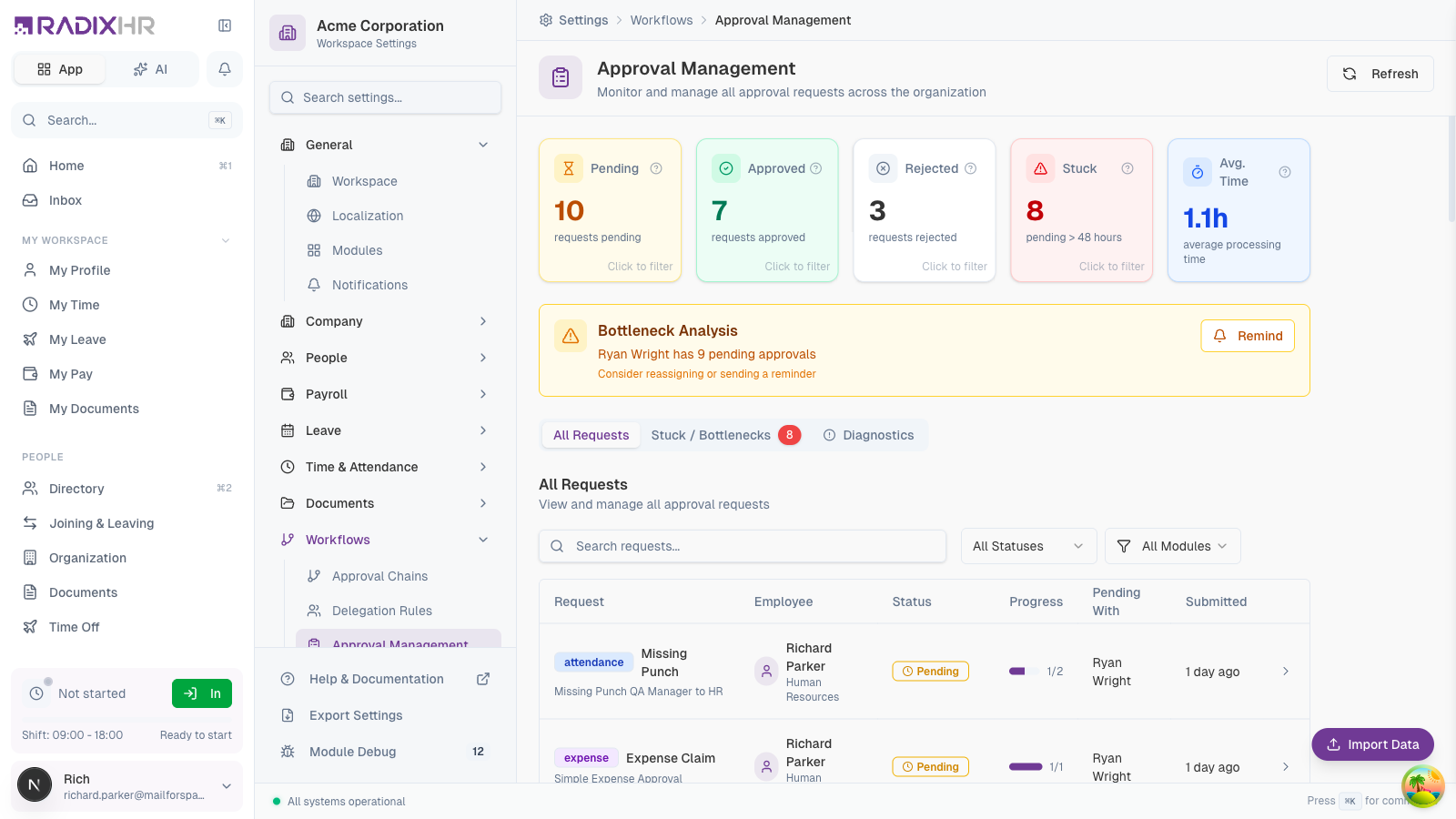
The Approval Management dashboard displays key metrics and tools for managing approval workflows:
Status Cards
At the top of the page, you’ll see summary cards showing the current state of approvals:
| Card | Description |
|---|---|
| Pending | Number of requests currently waiting for approval |
| Approved | Number of requests that have been fully approved |
| Rejected | Number of requests that have been rejected |
| Stuck | Requests pending for more than 48 hours (requires attention) |
| Avg. Time | Average time to process approval requests |
Click any card to filter the request list by that status.
Bottleneck Analysis
When the system detects an approver with an unusually high number of pending requests, it displays a Bottleneck Analysis alert. This helps you identify approval delays before they become critical.
When you see a bottleneck alert, consider sending a reminder to the approver or reassigning some of their pending requests to maintain workflow efficiency.
Request Tabs
The page includes three tabs for different views of approval requests:
All Requests
The default view showing all approval requests across the organization.
| Column | Description |
|---|---|
| Employee | The person who submitted the request, with their department underneath |
| Request | A module badge (leave, attendance, expense, …), the request type (e.g., Leave Request, Wrong Punch) and the workflow that is handling it |
| Status | Current status badge — Pending, Approved, Rejected, Cancelled, or Stuck |
| Progress | A bar plus step count (e.g., 1/2 means step 1 of 2 is complete) |
| Pending With | The approver who needs to act next. Shows +1 more when several people can approve the step, or - when nothing is pending |
| Submitted | How long ago the request was submitted (e.g., “about 20 hours ago”). Stuck requests also show Pending Nh in red |
| › | Opens the Request Details panel (see below) |
Filtering Requests
Above the table:
- Search requests… — type a name or keyword
- All Statuses — filter by Pending, Approved, Rejected, Cancelled, or Stuck
- All Modules — filter by module (Attendance, Leave, Expense, …)
- Clear — appears once a filter is active; resets everything
The table is paginated — use the 25 / page and Page N of M controls at the bottom to change page size or move between pages. Click Refresh (top-right of the page) to reload the counts and list.
Stuck / Bottlenecks
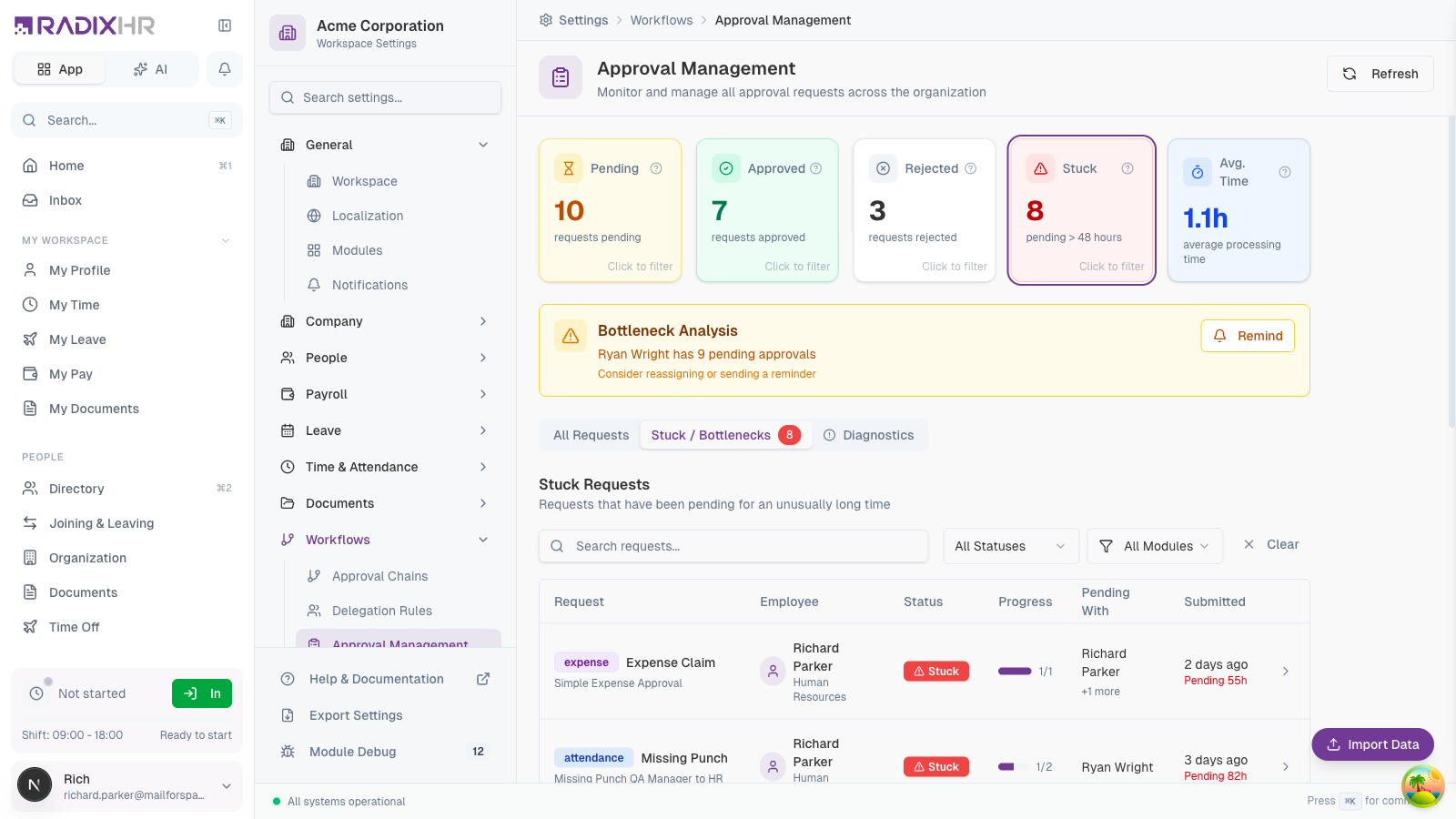
This tab shows requests that have been pending for an unusually long time (more than 48 hours). These requests need attention to prevent workflow delays.
For each stuck request, you can see:
- How long it has been pending (e.g., “Pending 82h”)
- Who is responsible for the next action
- Which approval step is currently pending
Diagnostics
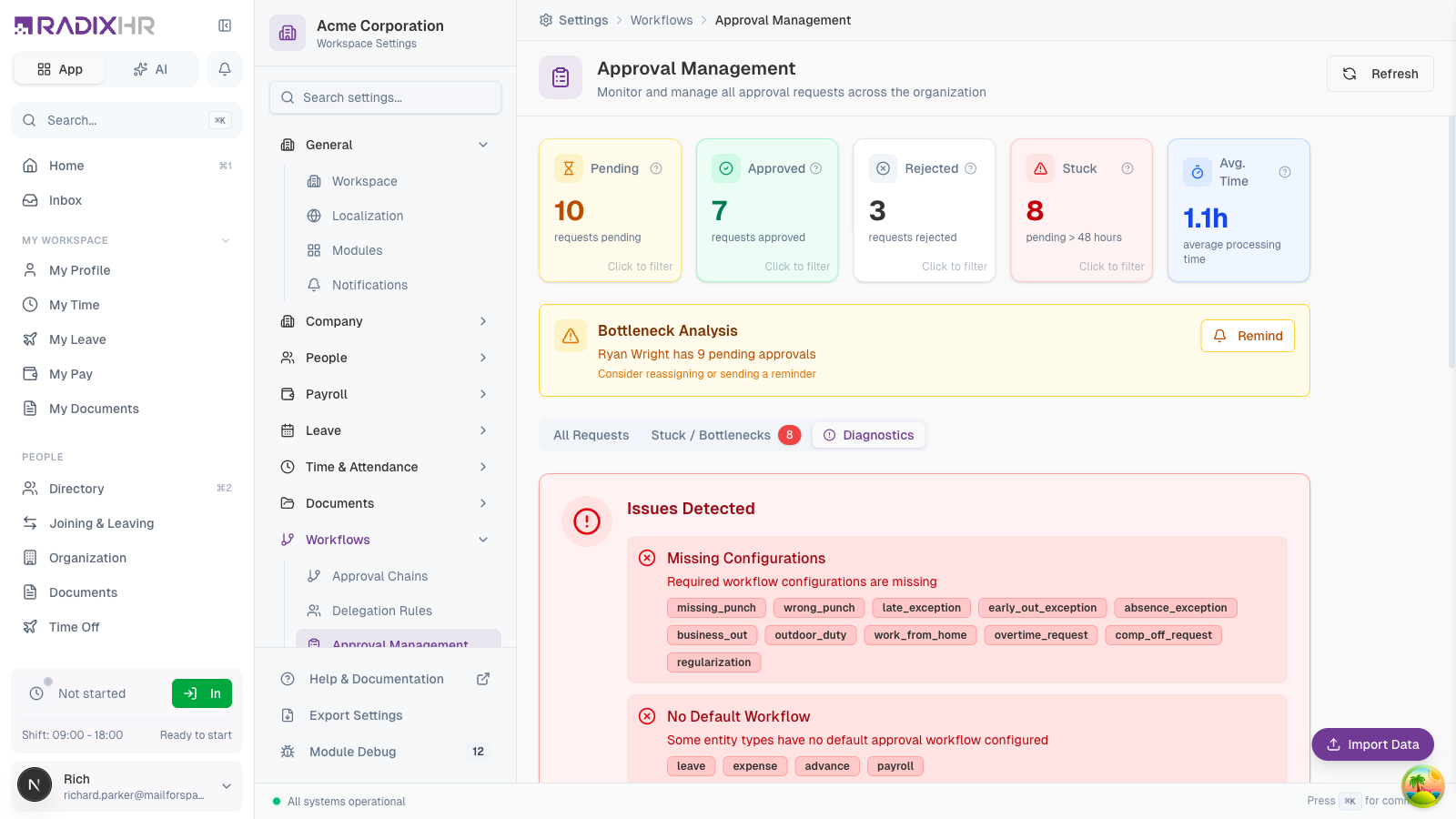
The Diagnostics tab helps you identify and fix workflow configuration issues:
Issues Detected
| Issue Type | Description |
|---|---|
| Missing Configurations | Entity types (like missing_punch, overtime_request) that don’t have approval workflows configured |
| No Default Workflow | Modules without a default approval workflow, which can cause requests to fail |
| Orphaned Requests | Requests that lost their workflow assignment and need manual intervention |
Orphaned Requests
When requests become “orphaned” (disconnected from their workflow), they appear in this table. This can happen when:
- A workflow is deleted while requests are in progress
- The workflow configuration changes incompatibly
- A system error occurs during request processing
To fix orphaned requests, create an approval chain for the affected module and entity type, or manually reassign the requests.
Request Details
Click on any request row to open the Request Details panel:
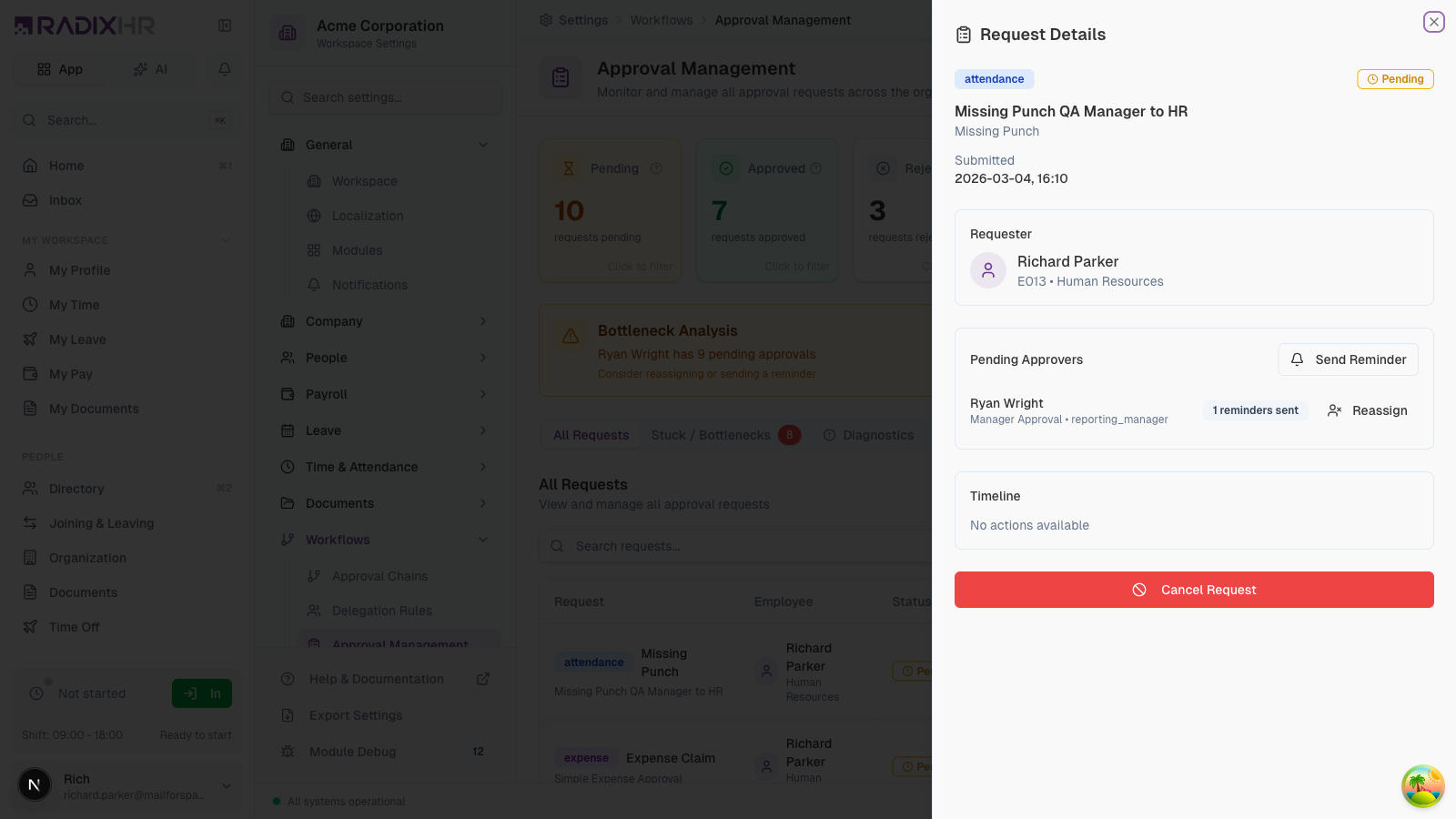
The details panel shows:
| Section | Information |
|---|---|
| Header | Module badge, status badge, workflow name, request type, and the Submitted date/time |
| Requester | Employee who submitted the request with their employee code and department |
| Pending Approvers | Who needs to act next, with the step name and their role (e.g., “HR Approval • hr_head”). Send Reminder and Reassign buttons sit in this card |
| Timeline | Every action taken so far — approver, step name, any comment they left, and the timestamp |
| Cancel Request | Red button at the bottom of the panel — only shown while the request is still pending |
Available Actions
From the request details panel, you can:
| Action | Description |
|---|---|
| Send Reminder | Notify the pending approver about the request |
| Reassign | Transfer the approval responsibility to a different person |
| Cancel Request | Cancel the request entirely (only for pending requests) |
Managing Stuck Requests
When requests are stuck, you have several options to resolve them:
Send a Reminder
- Open the stuck request details
- Click Send Reminder
- The system sends a notification to the pending approver
The request details show how many reminders have already been sent (e.g., “1 reminders sent”). Use this information to decide whether to send another reminder or escalate.
Reassign the Request
If the original approver is unavailable or unable to process the request:
- Open the request details
- Click Reassign next to the pending approver
- In the Reassign Approver dialog, search for and pick the new approver, and enter a Reason for Reassignment
- Click Reassign — the step moves to the new approver and they’re notified
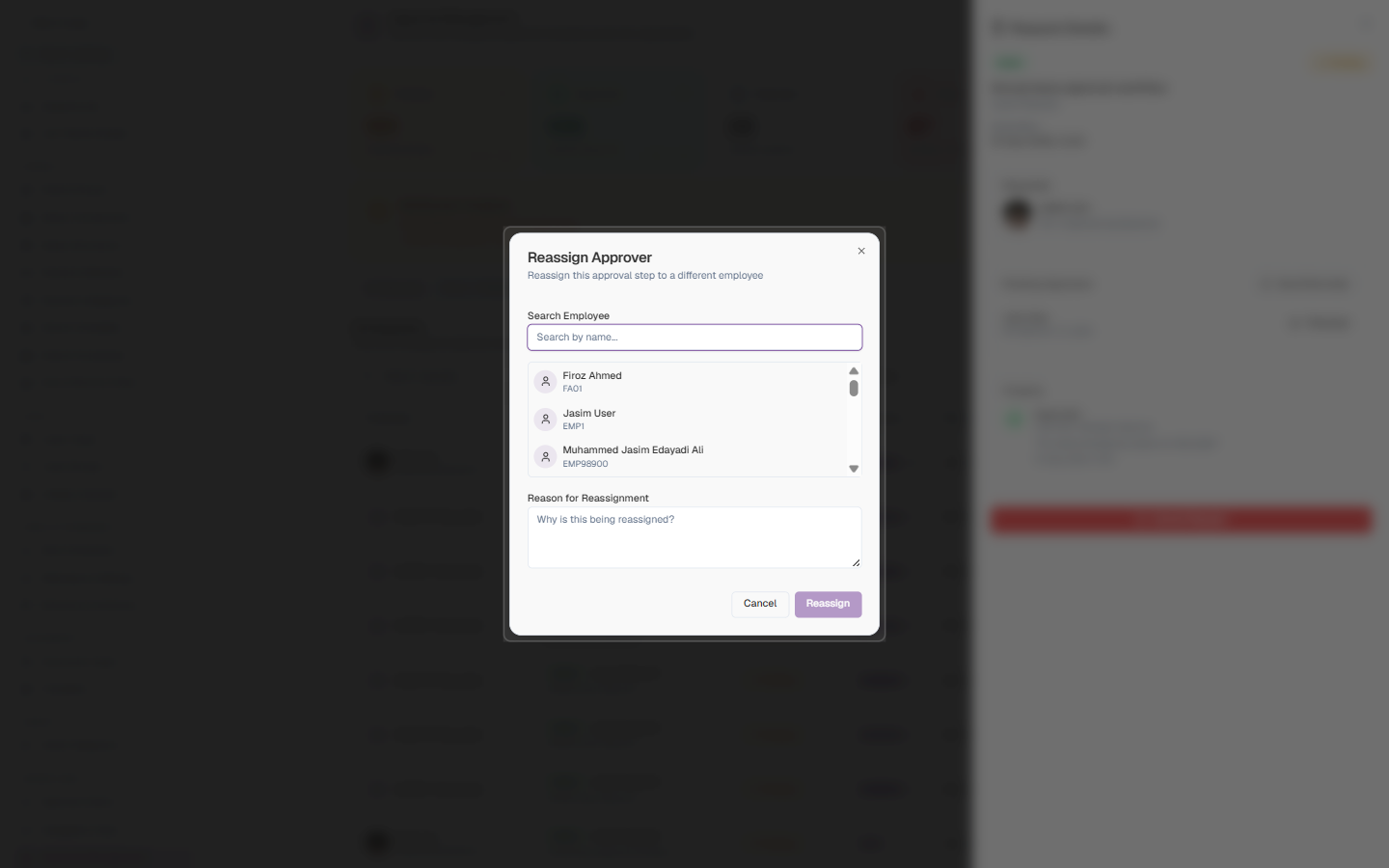
| Field | Description | Required |
|---|---|---|
| Search Employee | Type a name to filter the employee list, then click the person who should take over this approval step | Yes |
| Reason for Reassignment | Why the step is being moved — recorded in the request timeline for audit | Yes |
Cancel the Request
For requests that are no longer needed:
- Open the request details
- Click Cancel Request
- Confirm the cancellation
Cancelling a request is permanent. The employee will need to submit a new request if they still need approval.
Best Practices
- Check daily: Review the Approval Management page daily to catch stuck requests early
- Monitor bottlenecks: Pay attention to bottleneck alerts and address them promptly
- Fix diagnostics issues: Resolve missing configurations to prevent future problems
- Use reminders sparingly: Give approvers reasonable time before sending reminders
- Document reassignments: When reassigning requests, communicate with both the original and new approver
Set up delegation rules for approvers who will be away. This proactively prevents stuck requests before they occur.
Understanding Request Statuses
| Status | Description |
|---|---|
| Pending | Request is awaiting approval (within normal timeframe) |
| Stuck | Request has been pending for more than 48 hours |
| Approved | All approval steps have been completed successfully |
| Rejected | Request was rejected by an approver |
| Cancelled | Request was cancelled by the requester or an administrator |