About
A read-only diagnostics and help page — what version of RadixHR you’re running, whether its background services are healthy, and where to find support. This is a new page (added September 2026).
What you can see here:
- The app version, build, and environment you’re on
- Whether background services (database, storage, PDF generation, AI features, WhatsApp) are responding
- Links to documentation, terms of service, and privacy policy
- Your workspace ID, for quoting when you contact support
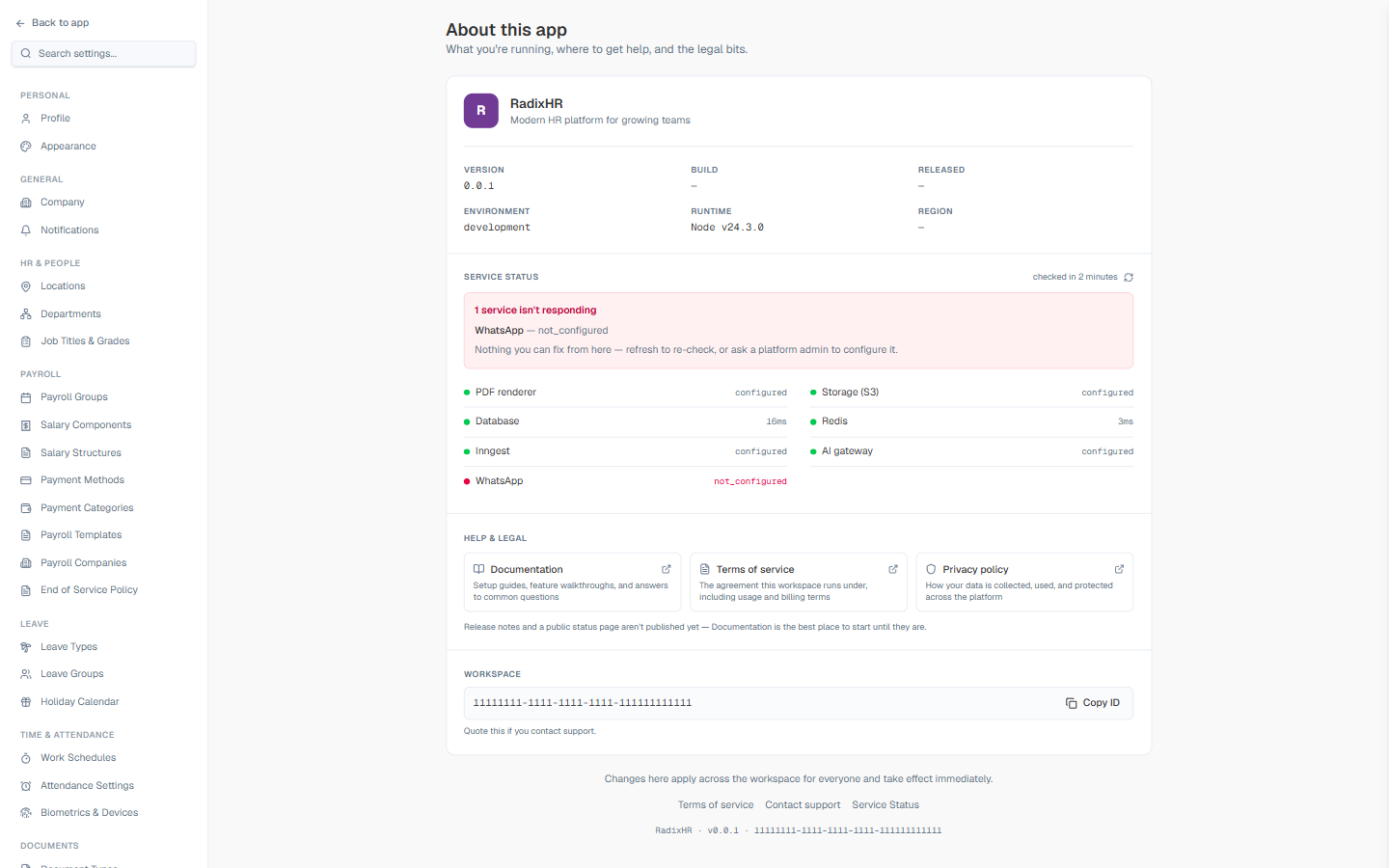
This page is informational only — there’s nothing to configure here. If you spot a problem (like a service showing as unavailable), the fix is usually to refresh and re-check, or to contact support with the details shown here.
App Info
| Field | Description |
|---|---|
| Version | The RadixHR release you’re running |
| Build | Build identifier, if published |
| Released | Release date, if published |
| Environment | Which environment you’re on (e.g., production) |
| Runtime | The underlying Node.js runtime version |
| Region | The hosting region, if published |
Service Status
A live health check of the systems RadixHR depends on: PDF renderer, Storage (S3), Database, Redis, Inngest (background jobs), AI gateway, and WhatsApp. Each shows configured or a response time in milliseconds when healthy, or a warning banner when something isn’t responding.
If a service shows as not_configured or unresponsive, there’s nothing you can fix from this page — click the refresh icon to re-check, or contact your platform admin if it persists.
Help & Legal
Three quick links: Documentation (setup guides and walkthroughs), Terms of service, and Privacy policy. A note below them explains that release notes and a public status page aren’t published yet.
Workspace
Your workspace’s unique ID, with a Copy ID button. Quote this when you contact support so they can find your workspace immediately.
Changes made elsewhere in Settings apply across the whole workspace for everyone and take effect immediately — this About page doesn’t have any settings of its own to worry about, but it’s a good reminder as you navigate the rest of Settings.