Time Off & Leave
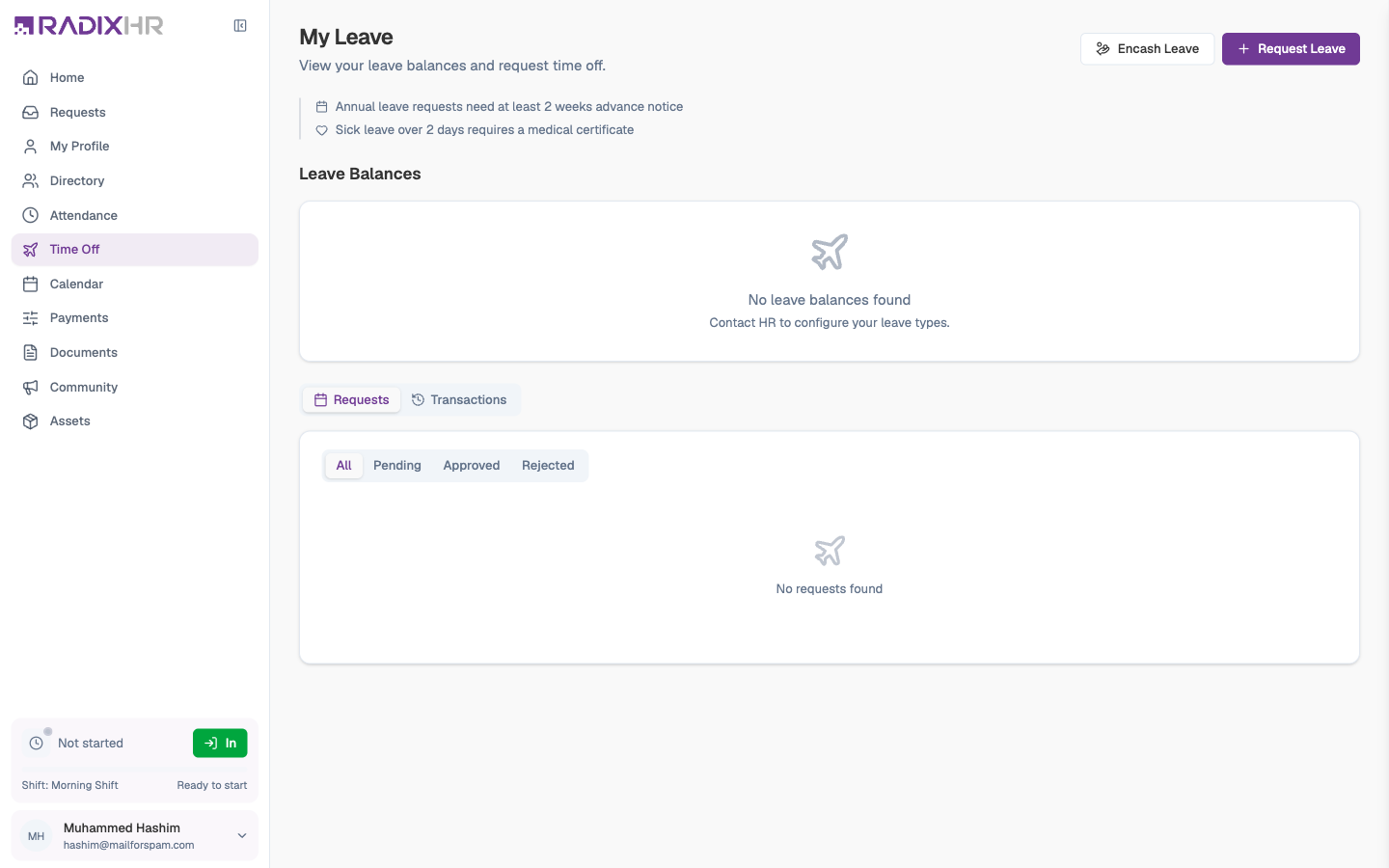
My Time Off (the page is titled My Leave) is where you book holidays and other leave, check how many days you have left, and follow each request through approval. It also shows the history behind your balance and a forecast of where you’ll end the year — so you can plan time off before days are lost.
What you can do here:
- See your Annual Leave balance at a glance — available, used, and your allowance for the year
- See how many days of other leave (sick, compassionate, unpaid, …) you’ve taken
- Request leave and watch it move through approval
- Withdraw a request you’ve changed your mind about
- Encash unused leave, if your company allows it
- Review every balance change under Transactions, and check the Forecast for year end
A Few Terms
- Allowance / entitlement — the number of leave days you get for the year.
- Accrual — leave that builds up month by month rather than being given all at once. If your annual leave accrues, you’ll see a Monthly Accrual line in your transactions each month.
- Carry forward — unused days moved into the next year. Not every company allows it; the Forecast tab tells you.
- Approval workflow — the chain of people who must approve your request (usually your manager, sometimes HR too).
What’s on the Page
| Area | What it shows |
|---|---|
| Year navigator | The leave year you’re looking at, with ‹ › arrows to move to another year. Next to it, the type of leave year your company uses (for example Calendar Year · 01/01 – 01/01/2027). |
| Policy reminders | The rules that apply to you, for example “Annual leave requests need at least 2 weeks advance notice” and “Sick leave over 2 days requires a medical certificate”. |
| Leave Balances | Your Annual Leave card — Available, Used, and Allowance — with a progress bar and a line such as “You’ve used 17 of 22.5 days this year”. Under Other Leave, one small card per other leave type showing the days used this year. |
| Upcoming Leave | Your next approved leave, with its dates and a Confirmed badge. |
| Requests / Transactions / Forecast | Three tabs explained below. |
| Encash Leave and Request Leave | The two buttons at the top-right. Encash Leave only appears if your company allows it. |
If your date of joining isn’t on file, or you haven’t been assigned a leave group, balances can’t be calculated and the page tells you to contact HR.
Requesting Leave
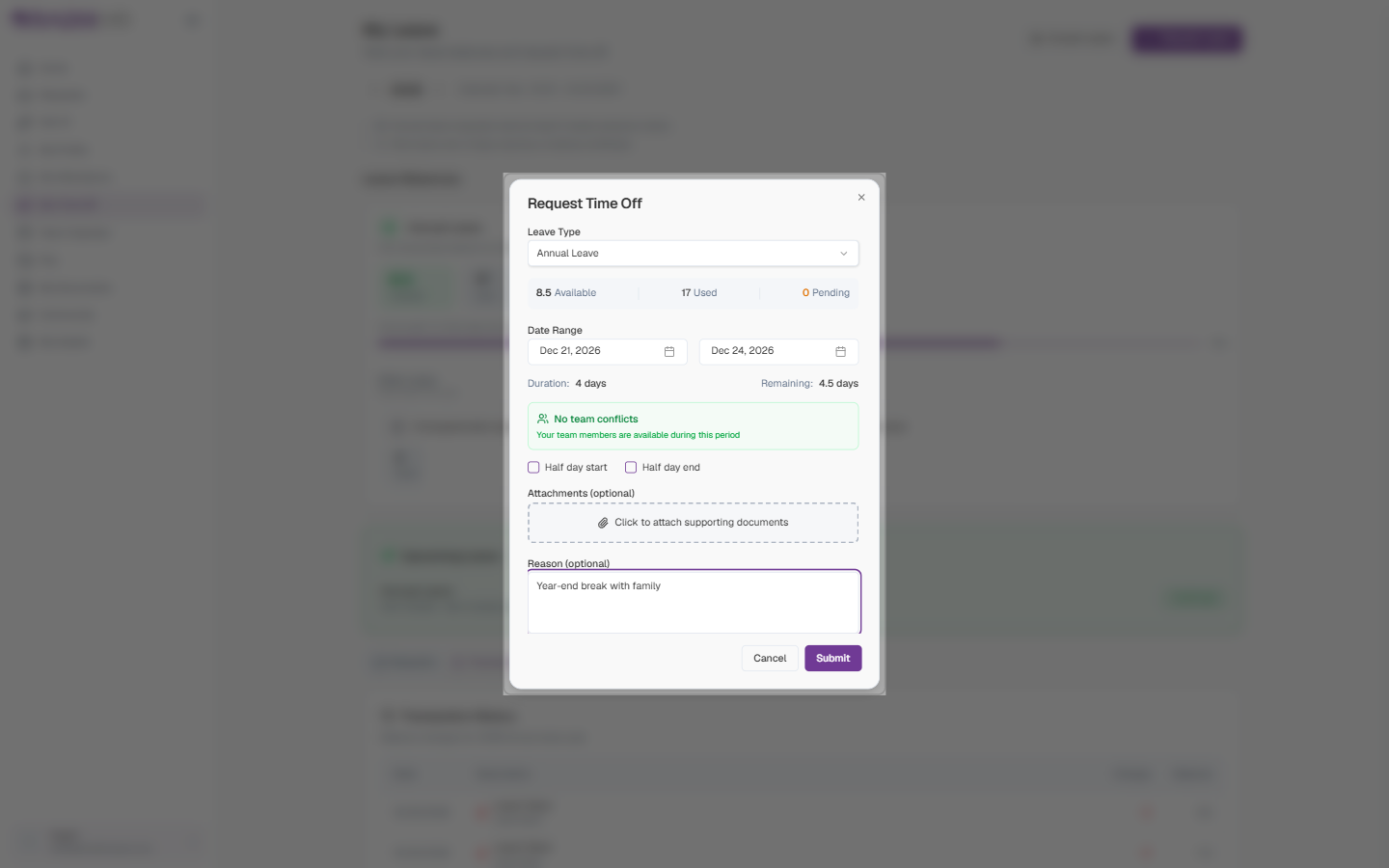
- Click Request Leave (top-right) — or use Request Leave under Quick Actions on your Home page.
- Choose a Leave Type. Your Available, Used, and Pending days for that type appear straight away.
- Pick a start date and an end date. The end date is filled in to match the start; change it for a longer break.
- Check the Duration and what your Remaining balance would be, and glance at the team conflicts box — it tells you if a colleague is already off on those dates.
- Tick Half day start or Half day end if you only need half of the first or last day.
- Attach a supporting document if one is needed (for example a medical certificate for sick leave over two days).
- Add a Reason if you’d like — it’s optional but helps your manager.
- Click Submit.
Field Descriptions
| Field | Description | Required |
|---|---|---|
| Leave Type | Annual Leave, Sick Leave, Compassionate Leave, Unpaid Leave, or whatever your company has set up. Only types in your leave group are listed. | Yes |
| Date Range | Start and end dates. The end date can’t be before the start date. | Yes |
| Duration / Remaining | Worked out for you: how many working days the range covers (weekends and holidays are skipped) and what you’d have left afterwards. | — |
| Team conflicts | Green “No team conflicts” when nobody on your team is off; otherwise it lists who is. | — |
| Half day start / Half day end | Take only half of the first or last day. Shown only for leave types that allow half days. | No |
| Attachments | PDF, JPG, PNG, DOC, or DOCX up to 10 MB each. Becomes required when the leave type demands a document beyond a certain length — the form says “Supporting document required for leave exceeding N days”. | Sometimes |
| Reason | A short note for your approver. | No |
After you submit, the request appears under the Requests tab as Pending and your manager is notified. Once approved it changes to Approved, shows under Upcoming Leave, and appears on your Calendar.
Things That Can Block a Request
| Message | What to do |
|---|---|
| You don’t have enough leave balance | Reduce the days, or choose another leave type (for example Unpaid Leave) |
| This leave requires at least N days advance notice | Book further ahead — annual leave often needs two weeks’ notice |
| You already have a leave request for these dates | Check the Requests tab; you’ve booked this already |
| You’ve reached the maximum of N requests per year | This leave type has an annual cap on requests |
| Minimum / maximum duration | The type has a shortest or longest allowed stretch |
| Please upload a supporting document before submitting | Attach the certificate or letter the type requires |
| Please add date of join first | HR needs to record your joining date before you can request leave |
Tracking Your Requests
The Requests tab lists every leave request for the selected year. Filter with All / Pending / Approved / Rejected, or use the dropdown on the right to show a single leave type.
Each row shows the leave type and length (for example Annual Leave · 3 days), the dates, your reason, and a status badge. A small +2 off badge means the range included weekend or holiday days that weren’t deducted. Click a row for the full detail — dates, duration in working days, your reason, any attached documents, and the approval history.
| Status | Meaning |
|---|---|
| Pending | Waiting for your manager (or the next approver) |
| Approved | Signed off — the days have been deducted from your balance |
| Rejected | Turned down; the reason is shown on the request |
| Cancelled | Withdrawn by you, or cancelled by your manager or HR — the days go back to your balance |
Withdrawing a Request
Changed your mind? A Withdraw button appears on a request while it’s still Pending and nobody has approved it yet.
- Click Withdraw on the request.
- Confirm with Withdraw Request — or click Keep Request to leave it alone.
Once your manager has actioned the first approval step, you can no longer withdraw the request yourself. Ask your manager or HR to cancel it for you.
Encashing Leave
Encashment means turning unused leave days into money in your salary. If your company allows it, an Encash Leave button sits next to Request Leave.
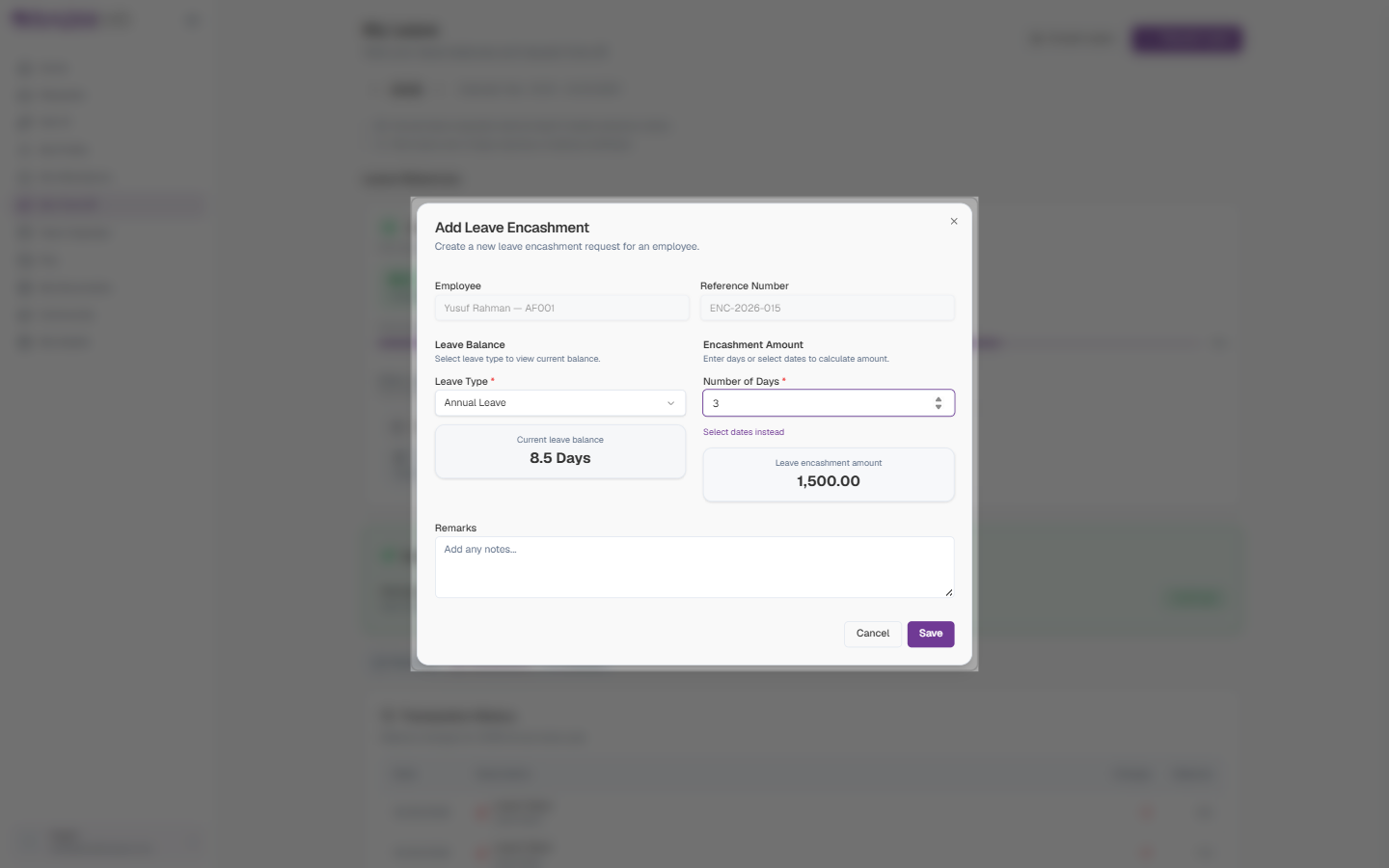
- Click Encash Leave.
- Choose a Leave Type — only types that permit encashment are listed. Your current balance for that type appears.
- Enter the Number of Days to encash — or click Select dates instead and pick a date range.
- The Leave encashment amount is calculated for you from your salary.
- Add Remarks if you’d like, then click Save.
| Field | Description | Required |
|---|---|---|
| Employee | You — filled in and locked | — |
| Reference Number | Filled in by the system | — |
| Leave Type | Which balance to encash from. Shows your current balance once chosen. | Yes |
| Number of Days | How many days to convert to pay. Can’t exceed your balance. | Yes (or a date range) |
| Leave encashment amount | Calculated automatically — you can’t type here | — |
| Remarks | Any notes for HR | No |
Your encashment request appears alongside your leave requests, marked with an Encashment badge, and needs approval like any other request. While it’s still Pending you can delete it from its card.
Transactions — the Story Behind Your Balance
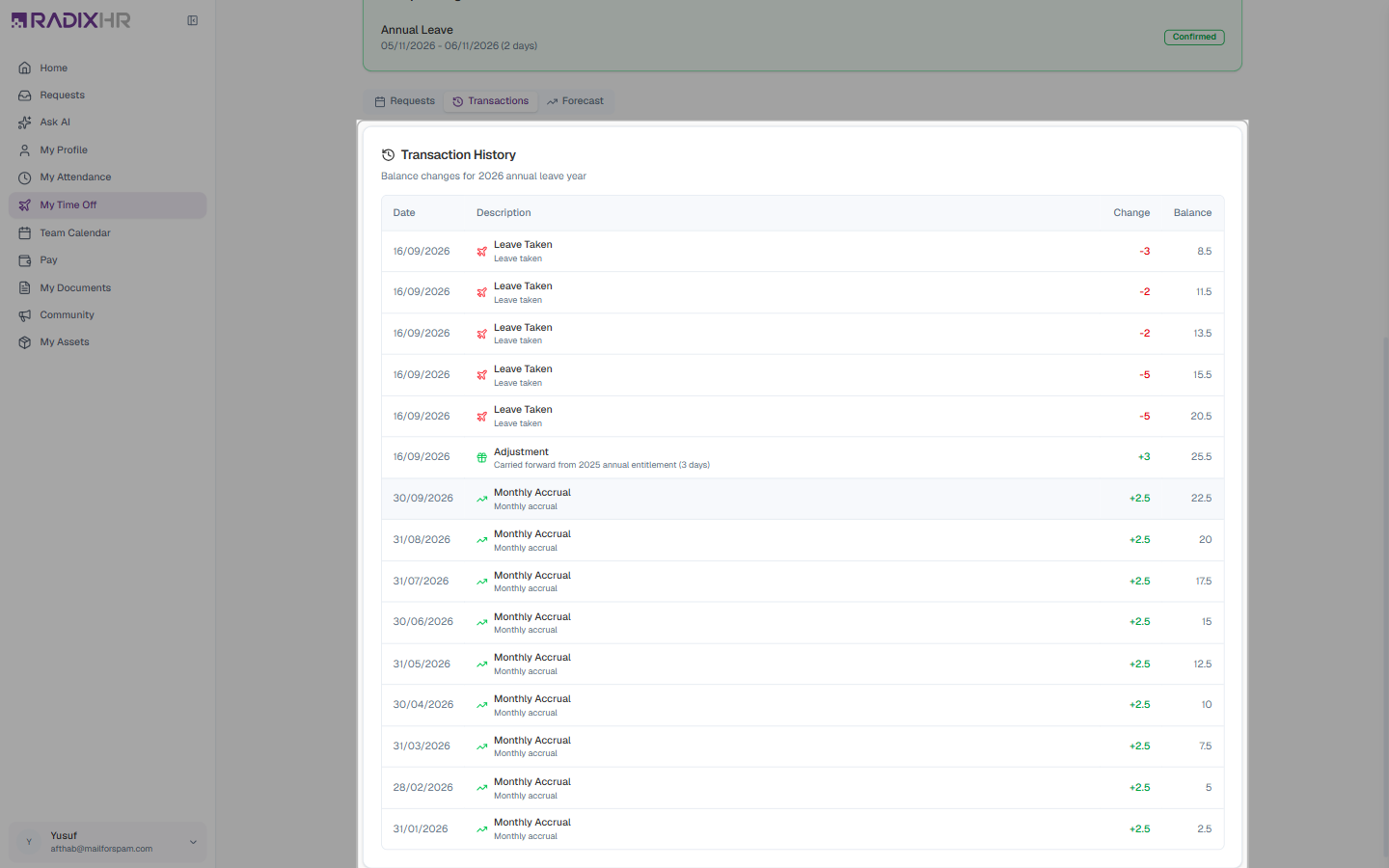
The Transactions tab is a ledger of every change to your annual leave balance for the year, newest first, with the running balance after each line.
| Column | What it shows |
|---|---|
| Date | When the change took effect |
| Description | The kind of change — Monthly Accrual (days added each month), Leave Taken (days deducted for an approved request), Adjustment (a manual change by HR, with their note — for example “Carried forward from 2025 annual entitlement”), or Leave Cancelled (days returned) |
| Change | The number of days added (green, +) or removed (red, −) |
| Balance | Your balance after that change |
If your balance doesn’t look right, this tab is the first place to look — you can see exactly which request or adjustment changed it, then ask HR about the specific line.
Forecast — Planning Ahead
The Forecast tab projects your annual leave to the end of the year, assuming your monthly accrual continues and your approved future leave goes ahead.
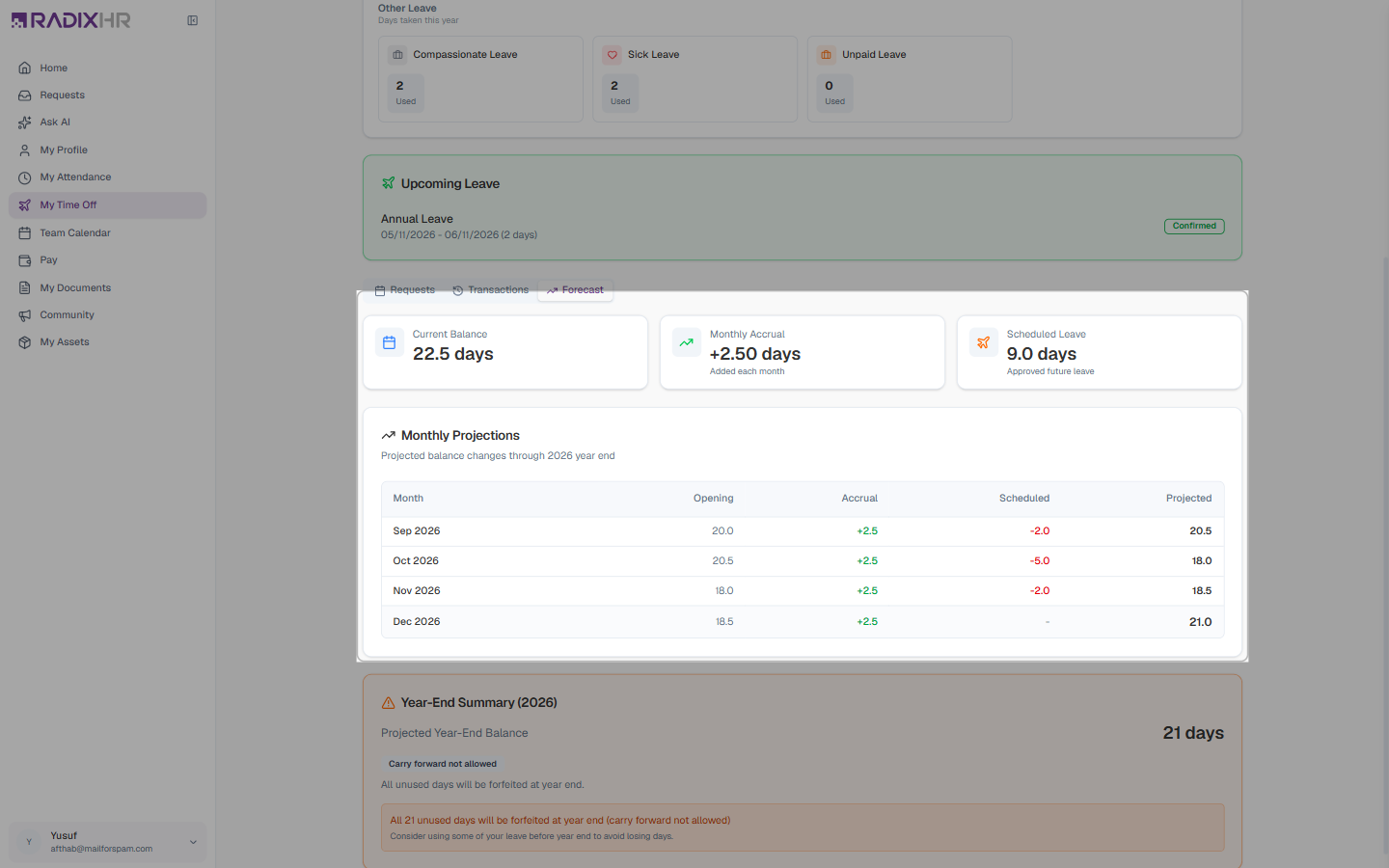
| Element | What it shows |
|---|---|
| Current Balance | Your balance today |
| Monthly Accrual | How many days are added each month |
| Scheduled Leave | Approved leave still to come |
| Monthly Projections | For each remaining month: the Opening balance, Accrual added, Scheduled leave deducted, and the Projected closing balance |
| Year-End Summary | Your Projected Year-End Balance, whether carry forward is allowed and up to how many days, and a warning of any days that would be forfeited |
If the Year-End Summary warns that days will be forfeited (for example “All 21 unused days will be forfeited at year end (carry forward not allowed)”), book some leave before the year closes — those days don’t come back.