End of Service Policy
End of Service (EOS) policies define how gratuity — the lump-sum payout an employee is owed when their employment ends — is calculated. Each policy specifies how many days of basic salary are awarded per year of service, what happens when the exit is a termination versus a resignation, and which other balances (leave salary, advances, fines) get settled in the final payout.
What you can do here:
- Define gratuity rules that match your country’s labour law (e.g., UAE Federal Decree Law No. 33 of 2021)
- Configure separate tier tables for terminations and resignations
- Choose which other balances get settled with the final payout (leave salary, salary advances, fines)
- Cap the maximum gratuity an employee can earn
- Maintain different policies for different employee groups or jurisdictions
What is gratuity? Gratuity (also called End of Service Benefit, or EOSB) is a lump-sum payment many countries’ labour laws require employers to pay an employee when employment ends. The amount is usually based on how long the employee worked and their basic salary at the end.
Understanding the Policies Table
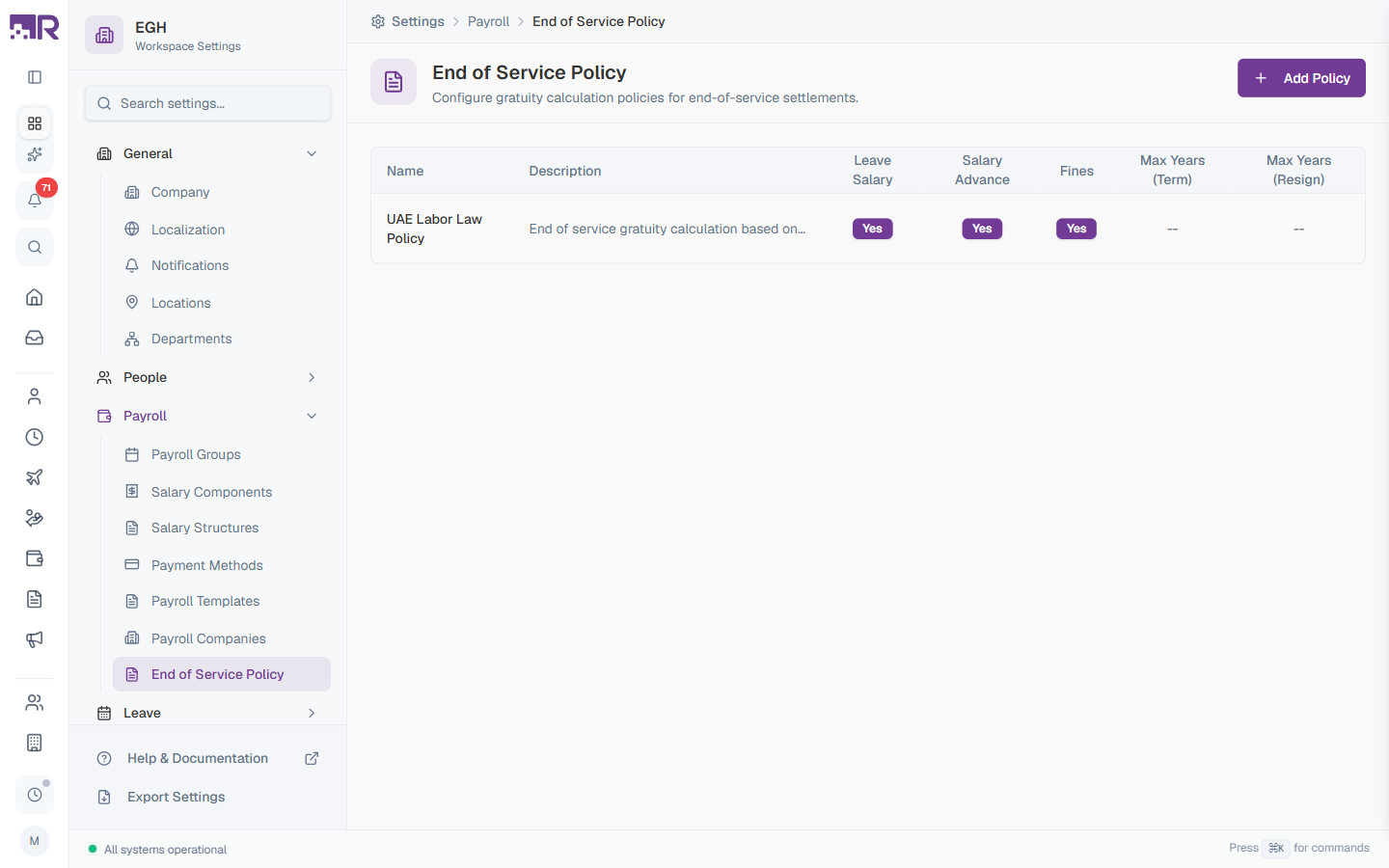
Each row in the table represents one EOS policy. The columns summarise how that policy will behave during a final settlement.
| Column | Description |
|---|---|
| Name | The display name of the policy (e.g., “UAE Labor Law Policy”) |
| Description | A short explanation of the policy’s basis (referenced labour law, special conditions, etc.) |
| Leave Salary | Yes if any unused leave balance is paid out with the gratuity, No if not |
| Salary Advance | Yes if outstanding salary advances are deducted from the final payout, No if not |
| Fines | Yes if outstanding fines are deducted from the final payout, No if not |
| Max Years (Term) | Cap on years of service used for gratuity when employment is terminated by the employer (-- means no cap) |
| Max Years (Resign) | Cap on years of service used for gratuity when the employee resigns (-- means no cap) |
How to Add an EOS Policy
- Go to Settings > Payroll > End of Service Policy
- Click Add Policy in the top-right
- Fill in the policy details
- Define Termination Tiers and Resignation Tiers
- Click Create
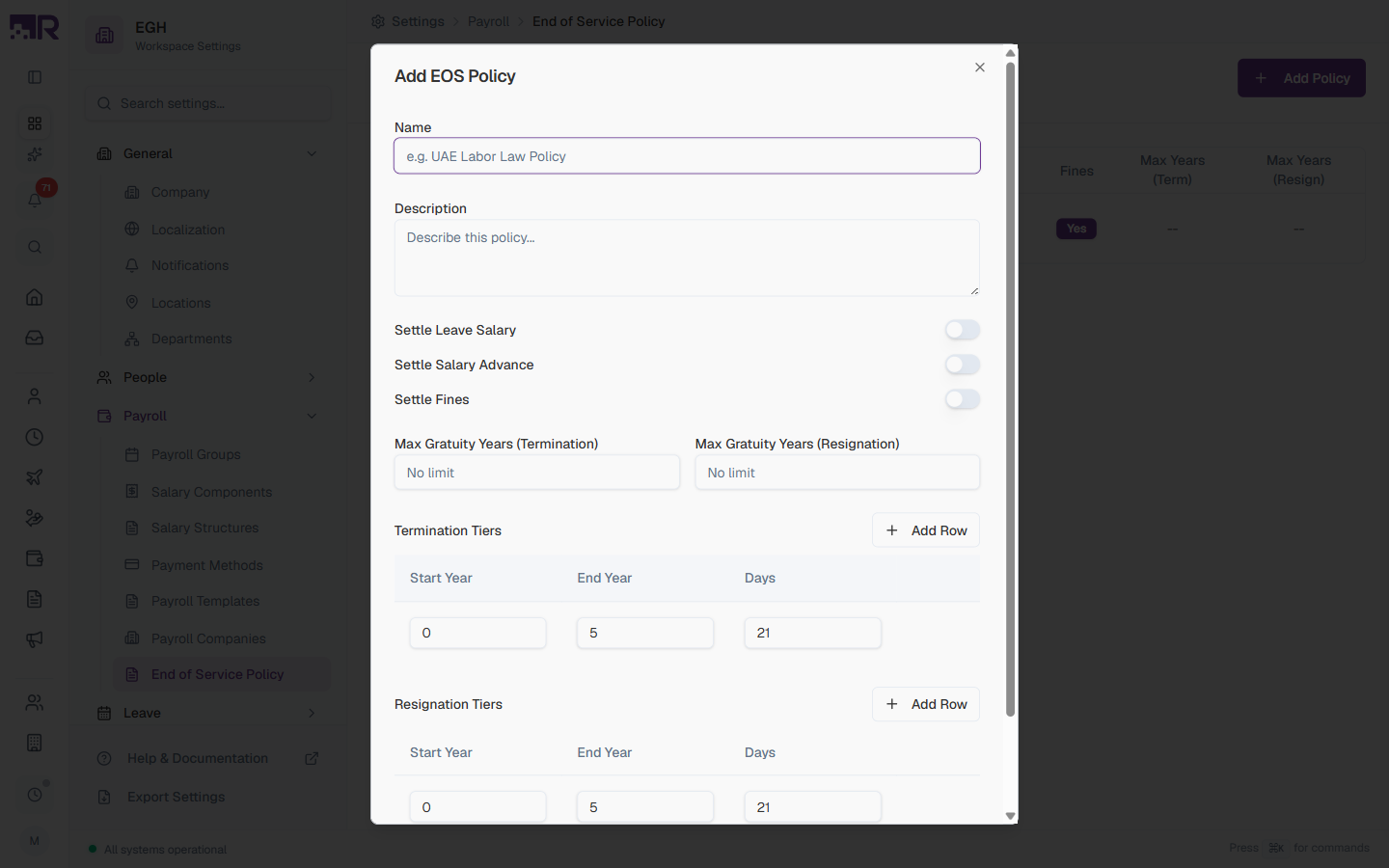
Basic Information
| Field | Description | Required |
|---|---|---|
| Name | A clear name for the policy. Use the labour law it’s based on or the employee group it applies to (e.g., “UAE Labor Law Policy”, “Saudi WPS Policy”). | Yes |
| Description | A longer explanation of what the policy does. Reference specific laws, decrees, or company-specific rules so future admins know what changed and why. | No |
Settlement Toggles
These toggles decide which other balances are reconciled with the final EOS payout. Each is OFF by default for new policies.
| Toggle | Description |
|---|---|
| Settle Leave Salary | ON: Any unused annual leave balance is paid out as part of the final settlement. OFF: Leave balance is forfeited or settled elsewhere. |
| Settle Salary Advance | ON: Any outstanding salary advance balance is deducted from the gratuity payout. OFF: Advances must be cleared separately. |
| Settle Fines | ON: Any outstanding fines or deductions on the employee’s record are subtracted from the final payout. OFF: Fines are settled separately or written off. |
Whether you must settle leave salary or advances on exit is usually determined by labour law and employment contracts. Check with your legal/HR team before changing these toggles for an existing policy.
Maximum Gratuity Caps
Some labour laws cap the gratuity at a fixed number of years of service (e.g., “no more than 2 years’ worth of wages”). These two fields enforce that cap.
| Field | Description | Required |
|---|---|---|
| Max Gratuity Years (Termination) | Maximum years of service that count toward gratuity when the employer ends the contract. Leave blank for No limit. | No |
| Max Gratuity Years (Resignation) | Maximum years of service that count toward gratuity when the employee resigns. Leave blank for No limit. | No |
Tier Tables — Termination & Resignation
Tiers define how many days of basic salary an employee earns per year of service, broken into year ranges. Most labour laws use a smaller rate for the first few years and a larger rate after that.
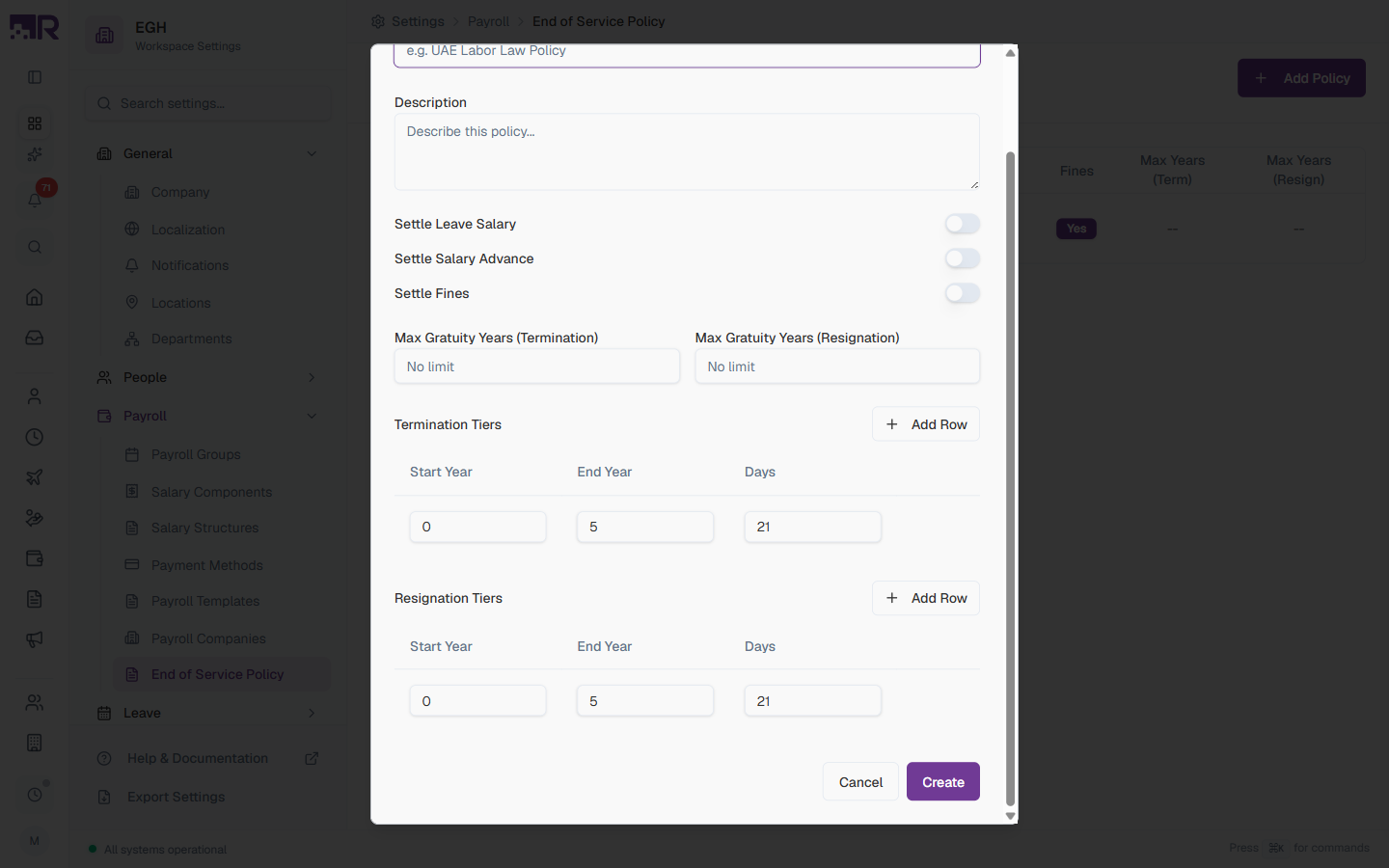
You configure two separate tier tables:
- Termination Tiers — applied when the employer terminates the employee
- Resignation Tiers — applied when the employee resigns
Each row in a tier table has:
| Field | Description |
|---|---|
| Start Year | The year of service this tier starts applying (inclusive). Use 0 for the first row. |
| End Year | The year of service this tier stops applying (exclusive). Use a large number like 99 for the last row to mean “and beyond”. |
| Days | The number of days of basic salary the employee earns per year worked within this tier. |
Click + Add Row to add another tier. Click the trash icon next to a row to remove it.
Example: UAE Labor Law
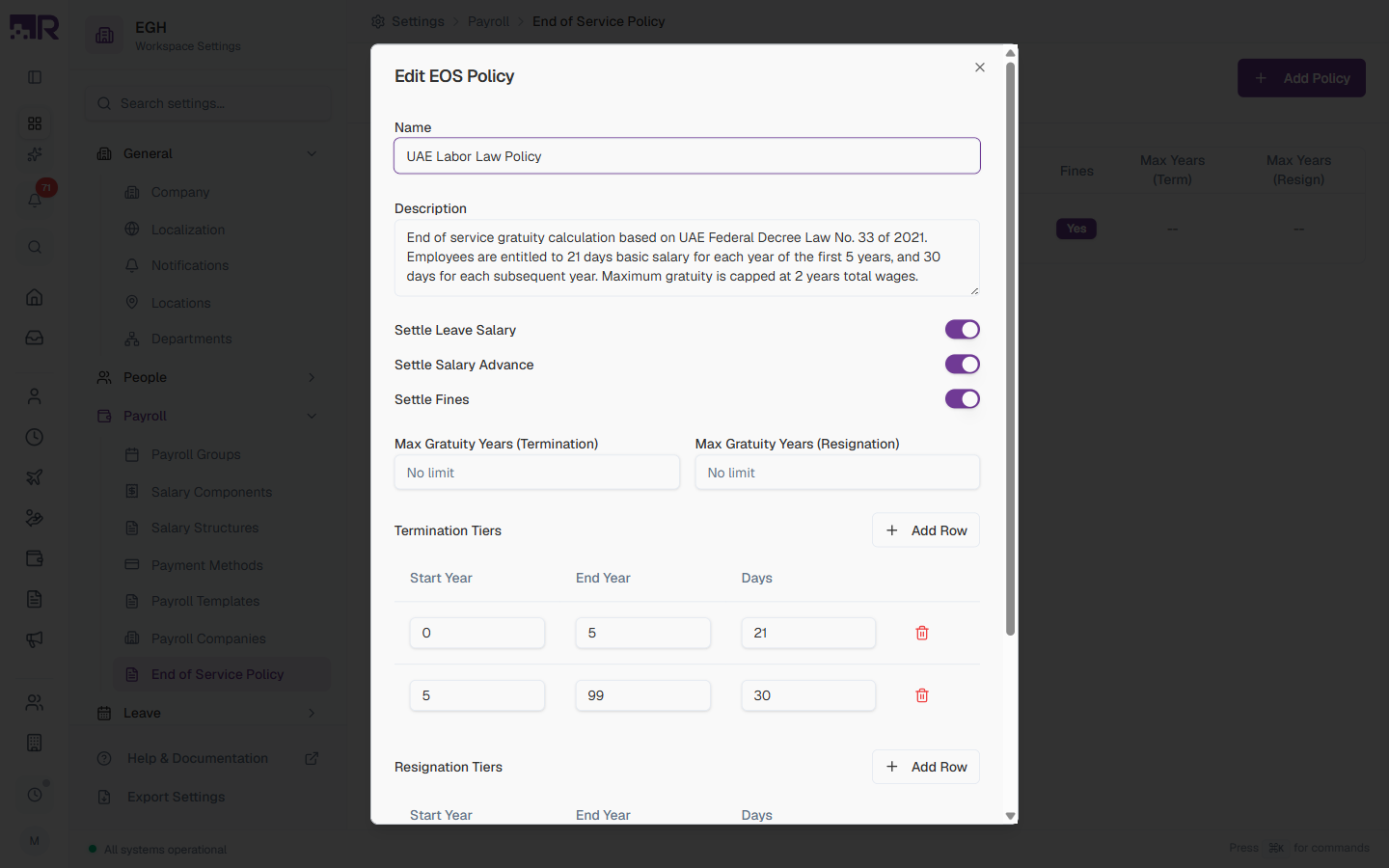
The default UAE Labor Law Policy in the workspace uses these tiers (identical for both termination and resignation):
| Start Year | End Year | Days | Meaning |
|---|---|---|---|
| 0 | 5 | 21 | First 5 years: 21 days of basic salary per year |
| 5 | 99 | 30 | Years 6+: 30 days of basic salary per year |
This matches UAE Federal Decree Law No. 33 of 2021, which entitles employees to 21 days of basic salary for each of the first 5 years and 30 days for each subsequent year, capped at 2 years’ total wages.
If your jurisdiction treats terminations and resignations the same, you can copy the same rows into both tier tables. If resignations get a reduced gratuity (some countries scale it by years of service), put the lower rates in the Resignation Tiers table only.
How to Edit a Policy
- In the policies table, click the row of the policy you want to update
- The Edit EOS Policy panel opens with the existing values pre-filled
- Change any fields, toggles, or tier rows
- Click Update
Editing a policy affects future settlements only. Final settlements that have already been processed and posted to payroll keep the values they were calculated with.
How EOS Policies Are Used
When an employee’s employment ends, RadixHR uses the assigned EOS policy to calculate their final settlement:
- Determine the exit type — termination or resignation
- Pick the matching tier table from the policy
- Walk the employee’s years of service through each tier and accumulate
days × basic salary / year × years in tier - Apply the Max Gratuity Years cap if set
- Add or subtract balances according to the Settle Leave Salary, Settle Salary Advance, and Settle Fines toggles
- Produce the final EOS payout
The result feeds into the End of Service area under Payments > End of Service, where Finance/HR can review and post the final settlement to payroll.
There’s no automatic policy assignment here. An EOS policy isn’t inherited from the Payroll Company, department, or any other grouping — it’s chosen (or left blank) individually, each time someone creates an End-of-Service settlement for a departing employee.
How This Actually Works
- Nothing assigns an EOS policy to an employee ahead of time. There is a technical “policy assigned to the employee” fallback the system checks, but there’s no page anywhere in the employee’s profile to set it — in practice it’s essentially never populated. Every settlement effectively needs its policy chosen explicitly on the New End of Service form.
- If the EOS Policy field is left blank and no employee-level fallback exists (the normal case), the gratuity calculates to 0.00 — silently, with no warning or error. The rest of the settlement (leave salary, advance/fine deductions) still calculates normally, so the Total Settlement shown can look legitimate even though gratuity itself is missing. This has already happened live in this workspace: two existing settlements are sitting at 0.00 gratuity, one already at Issued status.
- Before approving or issuing any settlement, check the Gratuity amount specifically — don’t rely on Total Settlement alone. A 0.00 gratuity on an employee with real tenure almost always means no policy was actually selected, not that the calculation legitimately came out to zero.
Always confirm the EOS Policy dropdown has a real policy selected before finalizing a settlement — an empty selection does not fall back to a “default” or “assigned” policy in any usable way, it just produces zero gratuity.
Common Scenarios
“Employees who resign should get a reduced gratuity compared to those we terminate — is that possible?” Yes — that’s exactly what the two separate tier tables are for. Put your normal rates in Termination Tiers and lower rates in Resignation Tiers for the same policy; the system already picks the matching table based on the recorded exit type, so no extra configuration is needed beyond filling in both tables differently.
“We have local and expat staff with different gratuity rules — how do I apply different EOS policies to each group?” Create both policies here (e.g. “Local Staff Policy” and “Expat Policy”) — there’s no grouping or Payroll Company setting that assigns one automatically, so whoever processes the final settlement needs to pick the correct policy for that employee on the New End of Service form each time. Naming policies clearly by the group they apply to (rather than just by law/decree) makes it obvious which one to pick.
“We just updated our gratuity tier rates — will this change the payout for employees who already left and were settled?” No — edits only apply to future settlements. Any final settlement that’s already been processed and posted to payroll keeps the values it was originally calculated with; there’s no retroactive recalculation.
Best Practices
-
Anchor each policy to a specific law or rule — name and describe it in terms of the legal basis (e.g., “UAE Federal Decree Law No. 33 of 2021”). It makes audits and updates easier when laws change.
-
Test with a known case — before relying on a new policy, run a final settlement for a hypothetical employee with a known expected gratuity to make sure the tiers are configured correctly.
-
Keep the description detailed — note any departures from the labour law (e.g., “we pay 25 days for years 1–5 even though the law says 21”). Future you will thank you.
-
Use separate policies per jurisdiction or employee group — don’t try to encode multi-country or multi-group rules in a single policy. Since there’s no automatic assignment, give each policy a name that makes it obvious which employees it’s for, so whoever processes a settlement picks the right one.
-
Review when laws change — set a calendar reminder to revisit policies whenever local labour laws are amended. Edits only affect future settlements, so keep them current.