Retention Policies
Retention Policies decide how long documents stay in the system and what happens once their retention period ends. A well-thought-out retention setup keeps you compliant with legal requirements, reduces unnecessary storage, and protects employees’ personal data from being kept longer than needed.
What you can do here:
- Set a default retention period for all documents
- Override the default with custom rules per document type
- Pick what triggers the retention countdown (creation date or termination)
- Choose whether expired documents are archived, deleted, or only flagged
- Auto-archive documents when an employee is terminated
- Send expiry-warning notifications a configurable number of days in advance
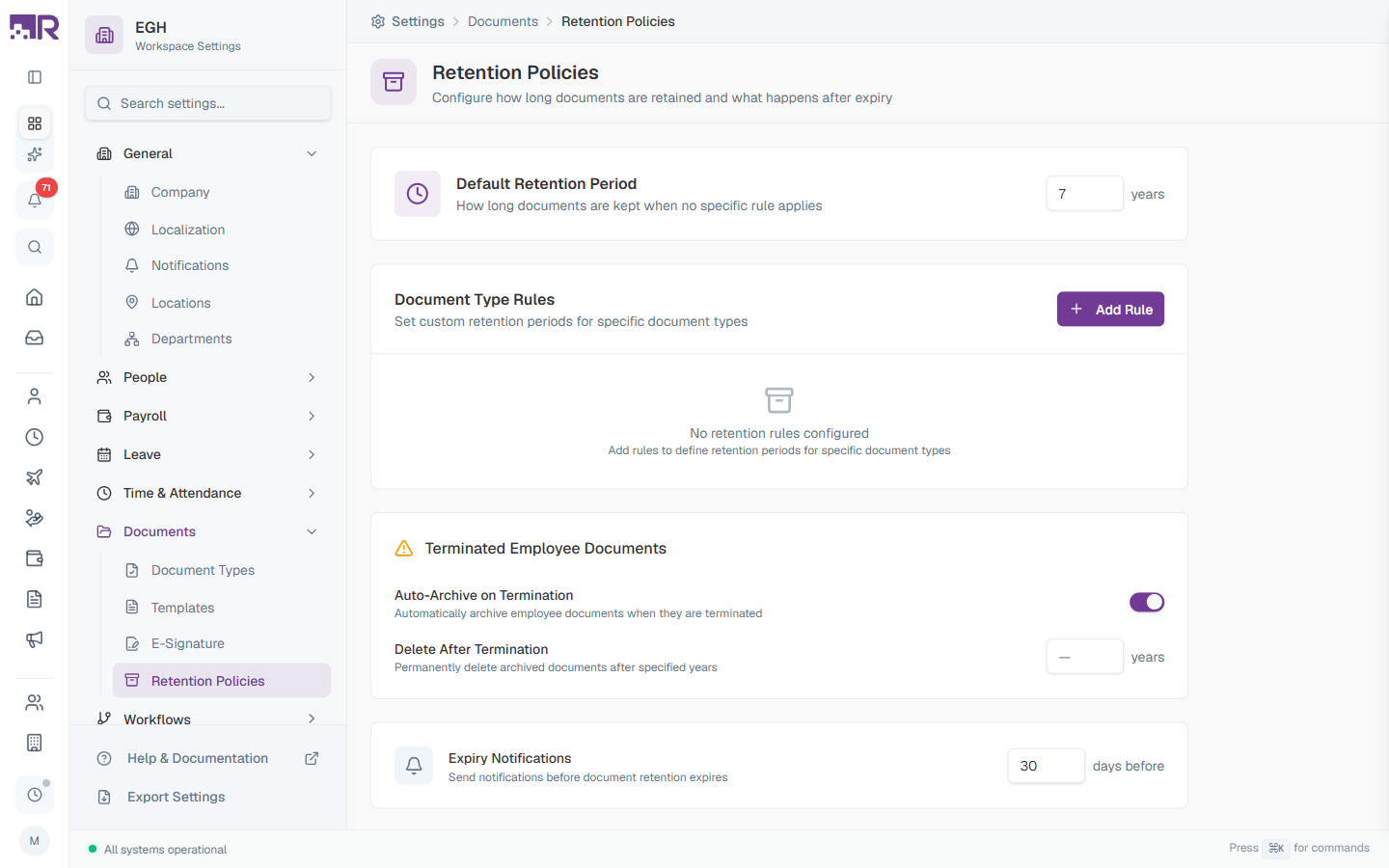
Page Layout
The page has four cards stacked top to bottom:
- Default Retention Period — fallback rule when no per-type rule applies
- Document Type Rules — per-document-type overrides
- Terminated Employee Documents — what happens when an employee leaves
- Expiry Notifications — advance warnings before documents expire
Not in the Settings sidebar (September 2026). The Documents group now lists only Document Types and Templates. This page still works — open it directly at /settings/documents/retention. There is no separate Save button: each field saves as you change it.
Retention requirements vary by jurisdiction and industry. Consult your legal/compliance team before configuring rules — incorrect retention can put you out of compliance with data-protection laws (e.g., GDPR) or labour-law record-keeping requirements.
Default Retention Period
This is the catch-all rule. Any document that doesn’t match a specific Document Type Rule uses this period.
| Setting | Description |
|---|---|
| Default Period (years) | Number of years to keep documents that don’t have a specific rule. Default: 7 years. Pick a conservative value that meets your minimum compliance baseline. |
The default exists as a safety net — even if you forget to add a per-type rule for a new document category, the default still applies. Set it to the longest period your jurisdiction requires for any document type, then shorten it for specific types via Document Type Rules.
Document Type Rules
Override the default retention for specific document types when they need different treatment (e.g., tax records have to be kept for 7 years even if your default is 5; insurance cards can be deleted after 1 year).
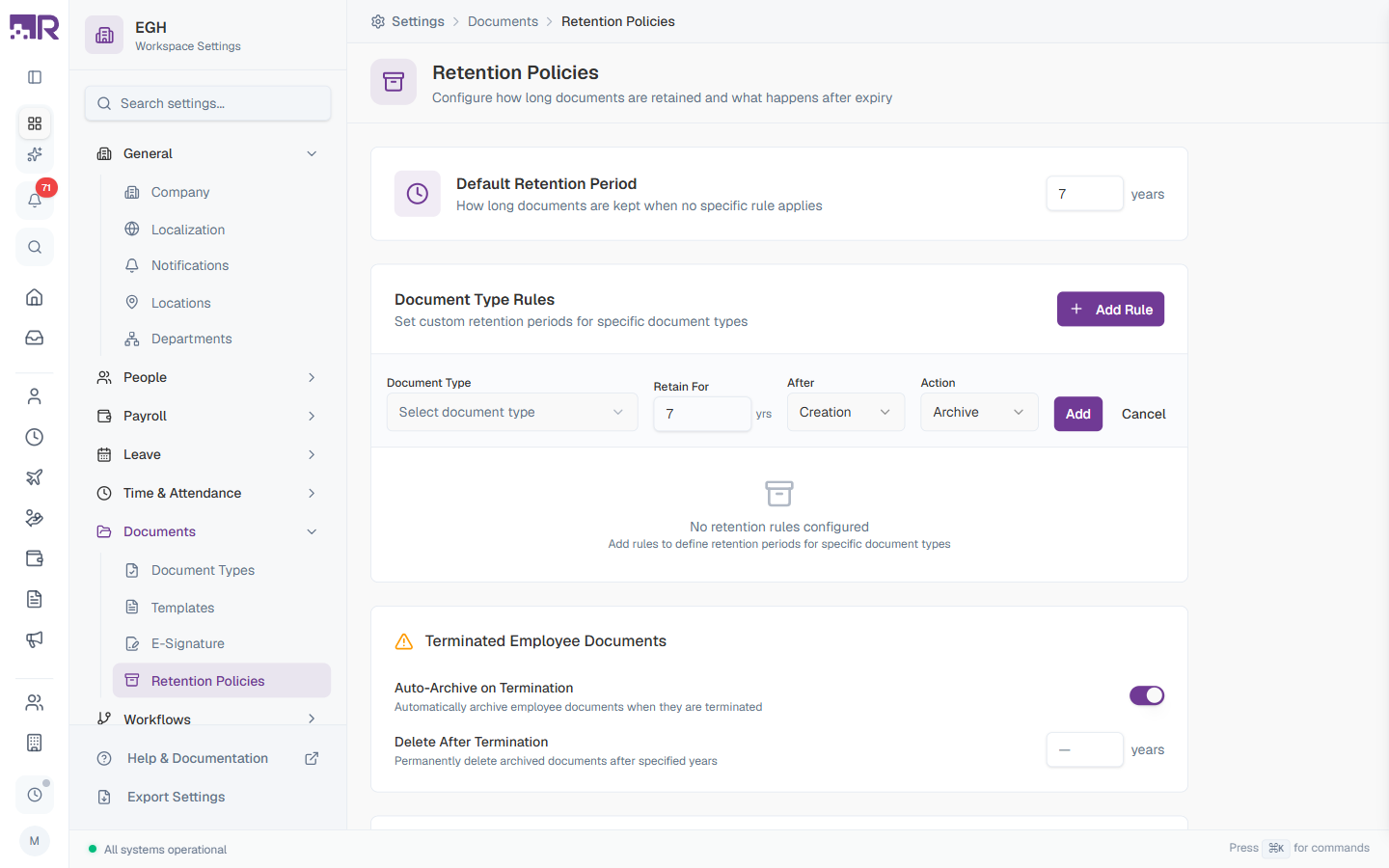
How to Add a Rule
- Click + Add Rule in the top-right of the Document Type Rules card
- An inline rule row appears with four fields
- Fill in each field (see table below)
- Click Add to save the rule, or Cancel to discard
The empty state shows “No retention rules configured — Add rules to define retention periods for specific document types” when no rules exist.
Rule Fields
| Field | Description | Default |
|---|---|---|
| Document Type | The document type this rule applies to. Pick from the document types you’ve created in Settings > Documents > Document Types. | ”Select document type” |
| Retain For (yrs) | Number of years to keep documents of this type. | 7 |
| After | When the retention countdown starts. Creation: counts from the document’s upload date. Termination: counts from the employee’s termination date. | Creation |
| Action | What happens when the retention period ends. Archive: move to archive storage. Delete: permanently remove. Notify Only: send a notification but take no automatic action. | Archive |
”After” Options Explained
| Option | When to use |
|---|---|
| Creation | Documents with fixed validity periods (e.g., insurance cards, training certificates, internal memos) |
| Termination | Documents that must be kept for a certain period after the employee leaves (e.g., employment contracts, payroll records, tax forms) |
“Action” Options Explained
| Action | Description |
|---|---|
| Archive | Document is moved to archive storage. It’s no longer active but remains accessible if you need to retrieve it. Recommended for most cases. |
| Delete | Document is permanently removed. Irreversible — only use when you’re certain the document can be legally destroyed and won’t be needed for audits, disputes, or compliance. |
| Notify Only | The system sends a notification when retention expires but does nothing to the document. Lets a human review before disposal. |
Delete is permanent. If you’re unsure, use Archive or Notify Only instead. You can always delete later, but you can’t un-delete.
Example Rules
| Document Type | Retain For | After | Action | Reason |
|---|---|---|---|---|
| Passport | 7 yrs | Termination | Archive | Reference for past employment history |
| Employment Contract | 10 yrs | Termination | Archive | May be needed for legal disputes after exit |
| Training Certificates | 3 yrs | Creation | Archive | Compliance evidence; certificates eventually expire anyway |
| Bank Account Letter | 1 yr | Creation | Delete | Single-use; no value after issuance |
| Health Insurance Card | 3 yrs | Creation | Notify Only | Manual review in case of pending claims |
Terminated Employee Documents
Settings that govern what happens to an employee’s documents when their employment ends. The card has a warning icon to flag that misconfiguring these settings can permanently destroy records.
| Setting | Description |
|---|---|
| Auto-Archive on Termination | ON: All documents belonging to a terminated employee are automatically archived on their last day. They’re preserved but moved out of active document lists. OFF: Documents remain in the active document list until they hit a retention rule. |
| Delete After Termination (years) | Permanently delete archived documents this many years after termination. Empty (—) means archived documents are kept indefinitely until a Document Type Rule says otherwise. |
Most organisations want Auto-Archive on Termination ON — it cleanly separates current employees’ documents from former employees’ without losing data. Combine it with Delete After Termination only if you have legal grounds to permanently destroy records after a fixed period.
Interaction with Document Type Rules
If a document has both a Document Type Rule and the Terminated Employee Documents settings could apply, the per-type rule wins:
- Look up the document type’s rule
- If a rule exists, follow that rule’s Retain For + After + Action
- If no rule exists, fall back to Default Retention Period + the Terminated Employee Documents auto-archive/delete behaviour
This means you can have aggressive defaults but specific exceptions — e.g., default delete-after-termination of 5 years, but Employment Contracts kept for 15 years via a per-type rule.
Expiry Notifications
| Setting | Description | Default |
|---|---|---|
| Days Before | Number of days before retention expiry when a notification is sent to document owners and HR admins. | 30 days |
Notifications give you a window to:
- Review documents before automatic action (archive/delete) is taken
- Extract information you need to keep
- Make exceptions for documents that should be retained longer than the rule says
- Bulk-export to an external archive before deletion
If you have Notify Only rules, this setting controls how far in advance the “review me” notification is sent. For Archive and Delete rules, the notification is also sent — so you have time to override the action if needed.
Best Practices
-
Consult legal counsel first — local labour law and data-protection rules (GDPR, CCPA, etc.) drive minimum and maximum retention periods. Get them documented before configuring.
-
Document why you chose each rule — keep an internal record (in a separate doc, not RadixHR) explaining the legal basis for each retention period. Useful during audits.
-
Start conservative, then tighten — default to Archive instead of Delete until you’ve validated the rule is correct. You can always switch to Delete later.
-
Use Notify Only for sensitive types — for documents where automatic deletion would be risky (medical records, legal correspondence), set the action to Notify Only so a human reviews before disposal.
-
Review annually — laws change. Audit retention rules every year to make sure they still match the current legal landscape.
-
Test with non-production data — before enabling Delete actions, run a small batch through with Notify Only first to confirm the rules trigger when expected.
-
Combine Default + Type Rules thoughtfully — set the Default Period to the longest minimum required by law, then use Document Type Rules to relax retention only where you’re confident it’s safe.
Common Compliance Reference Points
These are general guidelines — always verify the specific requirements that apply to your organisation:
| Document Type | Typical retention | Notes |
|---|---|---|
| Tax records | 5–7 years | Many jurisdictions require this. Check local revenue authority. |
| Employment records | 3–7 years after termination | Varies by labour law. |
| Payroll records | 3–7 years | Similar to tax records. |
| Medical records | 6–10 years | HIPAA in the US, similar rules elsewhere. |
| Training records | Until cert expires + 1–3 yrs | Compliance evidence. |
| Disciplinary records | 5+ years after termination | Defensive retention for legal disputes. |
Region-specific notes
| Region | Key consideration |
|---|---|
| EU (GDPR) | “Storage limitation” principle — don’t keep personal data longer than necessary. Need a documented justification for any retention period. |
| US (federal) | IRS records: 4 years after filing. EEOC: 1 year for hired/rejected applicants. State rules may extend this. |
| UAE | Labour Law Article 9 — keep employee records 2 years after termination. WPS records: 5 years. |
| India | Income Tax: 8 years. Employee files: 3 years post-termination minimum. |
| Healthcare | HIPAA / regional equivalents typically require 6–10 years. |
| Education | Student records often require permanent or very long retention. |
Common Scenarios
“We want departing employees’ documents deleted automatically 90 days after their last day — how do I set that?” Not precisely possible as described. Both Delete After Termination (on Terminated Employee Documents) and Retain For (on a per-Document-Type Rule with After: Termination) are specified in whole years, not days or months — there’s no documented way to configure a 90-day period. The closest achievable setting is 0 or 1 year via a Document Type Rule with After: Termination and Action: Delete; anything more precise than year-level granularity isn’t supported here. Given Delete is irreversible, double-check this against your actual legal retention requirement before using it at all — most organisations should prefer Archive anyway (see the Callout above).
“How long should I keep an ex-employee’s documents for UAE / India / US compliance?” See the region-specific table above for starting points (UAE: 2 years post-termination per Labour Law Article 9, India: 3 years minimum, US: varies by document type) — but confirm with your own legal/HR compliance team, since these are general reference points, not a guarantee your specific situation is covered.