Payroll Companies
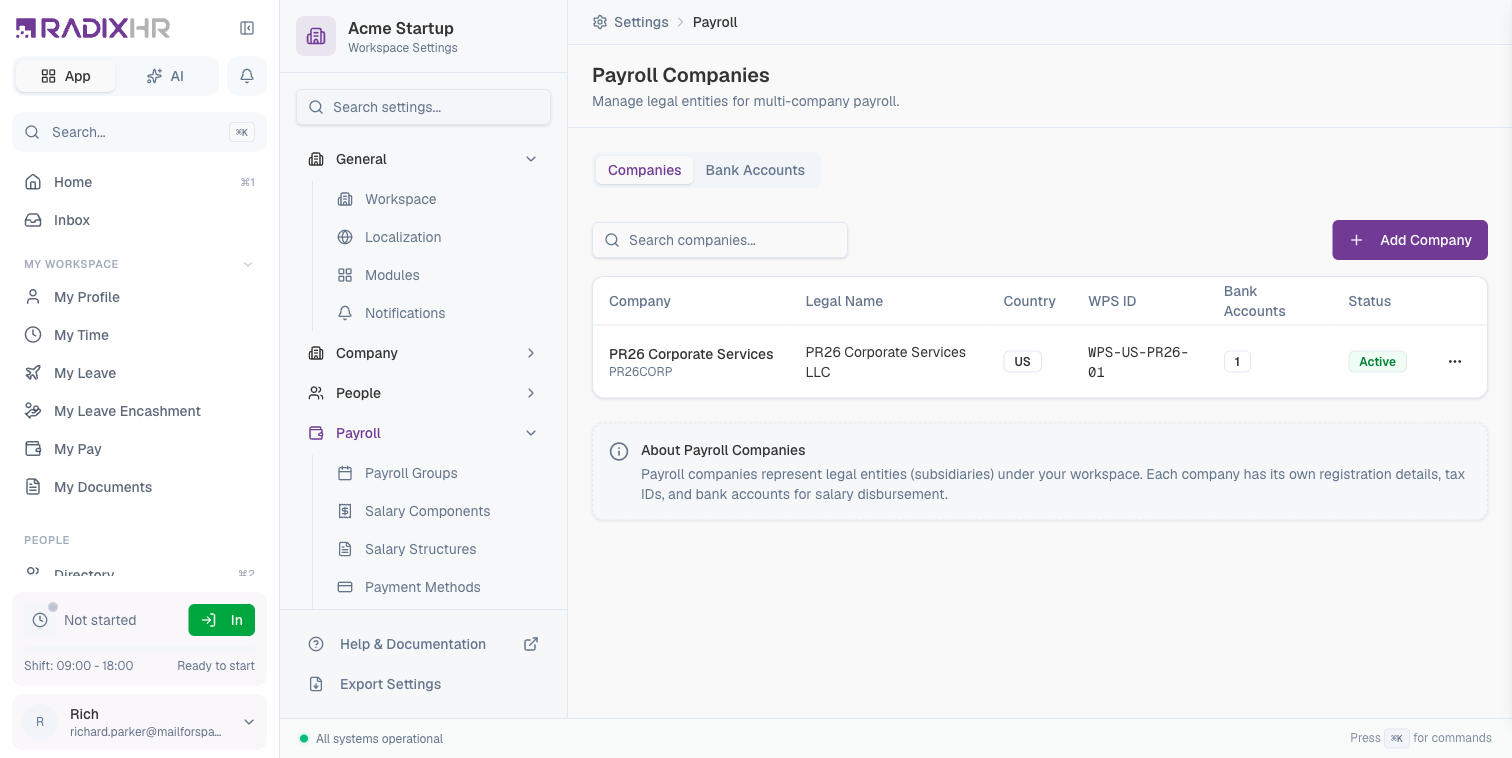
Payroll Companies represent legal entities (subsidiaries) under your workspace. Each company has its own registration details, tax IDs, and bank accounts for salary disbursement. This is essential for organizations with multiple legal entities operating under one HR system.
What you can do here:
- Create and manage multiple legal entities
- Configure company registration and tax details
- Set up bank accounts for each company
- Assign employees to specific payroll companies
Why Use Payroll Companies?
Payroll companies are essential for organizations that:
- Operate Multiple Entities: Have different legal entities (subsidiaries, branches) under one umbrella
- Multi-Country Operations: Run payroll in different countries with different legal requirements
- Separate Financial Reporting: Need to track payroll costs by legal entity
- Different Bank Accounts: Use different bank accounts for different entities
- Regulatory Compliance: Meet local registration and tax reporting requirements
Each employee is assigned to one payroll company. When running payroll, the system uses the company’s registration details and bank accounts for processing and reporting.
Companies Tab
The Companies tab lists all legal entities configured for payroll. Use the Search companies… box to filter, or click Add Company to create one.
Company Properties
| Column | Description |
|---|---|
| Company | The entity’s name, legal name, and code, stacked together. The default company (assigned to new employees) is marked with a Default badge here. |
| WPS ID | Wage Protection System ID (for UAE entities) |
| Bank Accounts | Number of bank accounts configured |
| Status | Active or Inactive |
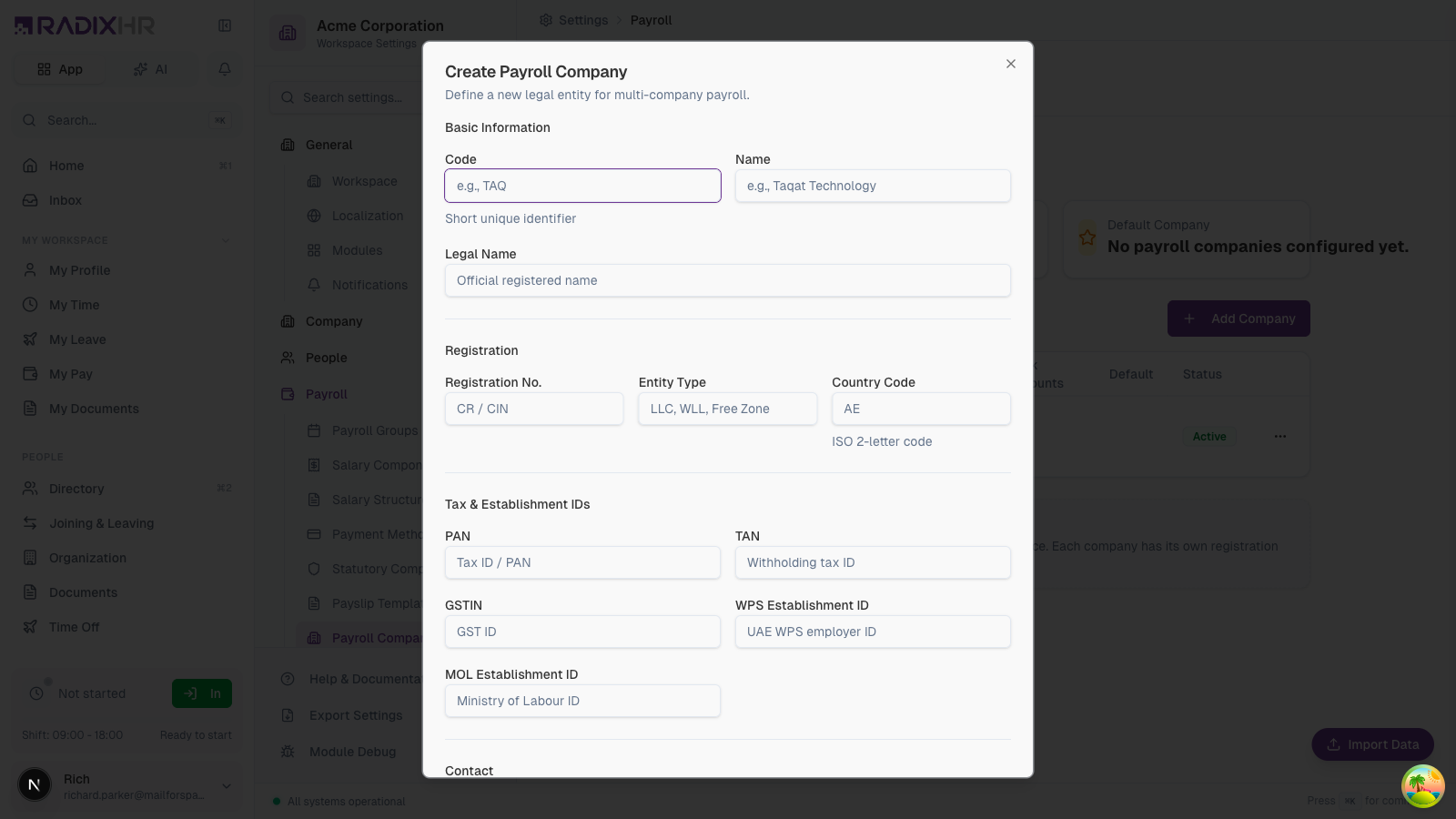
Creating a Payroll Company
- Click Add Company
- Fill in basic information
- Enter registration details
- Add tax and establishment IDs
- Provide contact information
- Click Create Company
Basic Information
| Field | Description | Required |
|---|---|---|
| Code | Short unique identifier (e.g., TAQ, ACME) | Yes |
| Name | Display name for the company | Yes |
| Legal Name | Official registered name | Yes |
Registration Details
| Field | Description | Required |
|---|---|---|
| Registration No. | Commercial registration number (CR/CIN) | No |
| Entity Type | Legal structure (LLC, WLL, Free Zone, etc.) | No |
| Country Code | ISO 2-letter country code (e.g., AE, US, IN) | Yes |
Tax & Establishment IDs
| Field | Description | Region |
|---|---|---|
| PAN | Permanent Account Number | India |
| TAN | Tax Deduction Account Number | India |
| GSTIN | Goods and Services Tax ID | India |
| WPS Establishment ID | Wage Protection System employer ID | UAE |
| MOL Establishment ID | Ministry of Labour ID | UAE |
Only fill in the tax IDs relevant to your company’s country of operation. Leave others blank.
Contact Information
| Field | Description |
|---|---|
| Company contact email | |
| Phone | Company phone number |
| Address | Registered business address |
Company Settings
| Setting | Description |
|---|---|
| Default Company | Use as the default for new employees |
| Active | Available for employee assignment |
Bank Accounts Tab
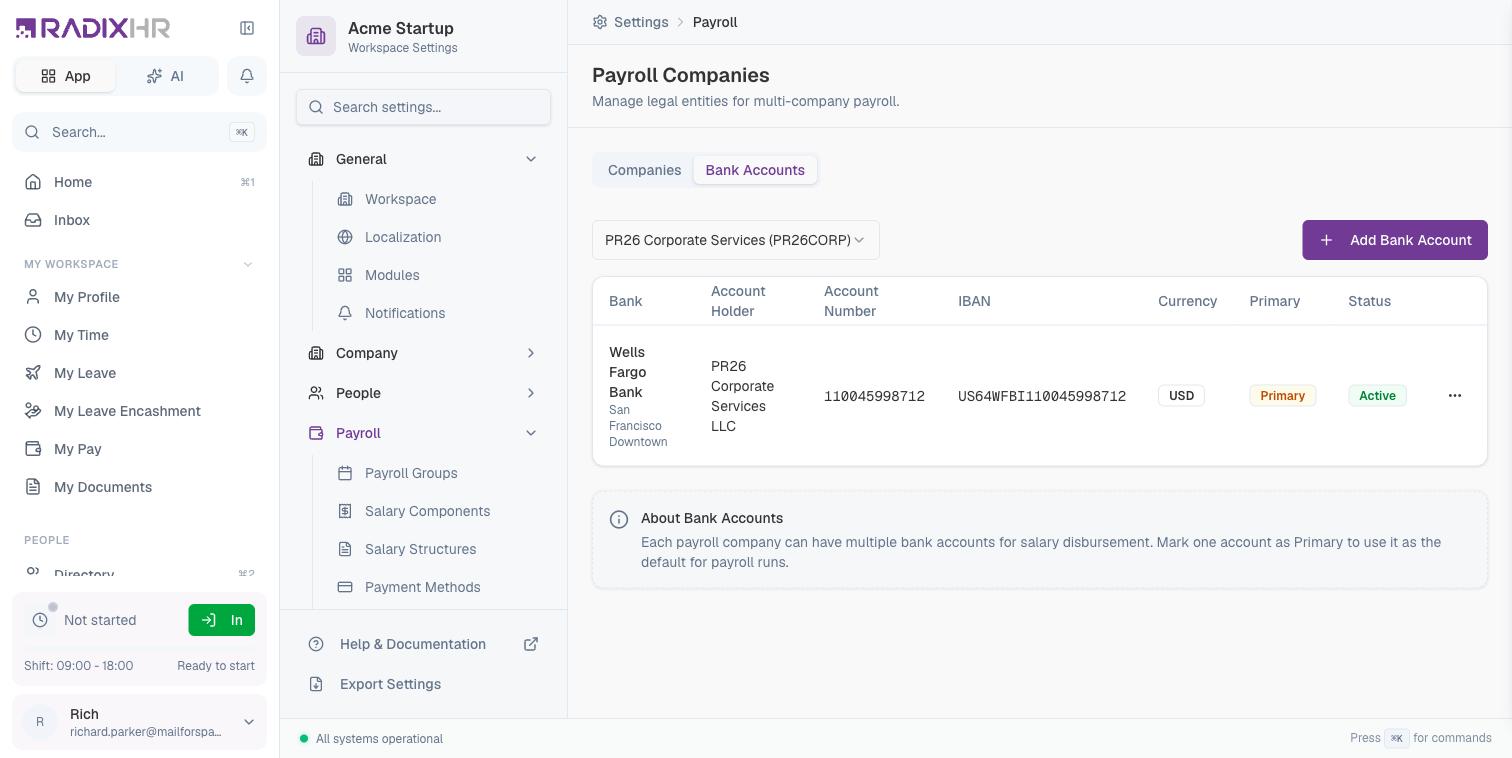
Each payroll company can have multiple bank accounts for salary disbursement.
Bank Account Properties
| Column | Description |
|---|---|
| Bank | Bank name and branch |
| Account Holder | Name on the account |
| Account Number | Bank account number |
| IBAN | International Bank Account Number |
| Currency | Account currency |
| Primary | Default account for payroll runs |
| Status | Active or Inactive |
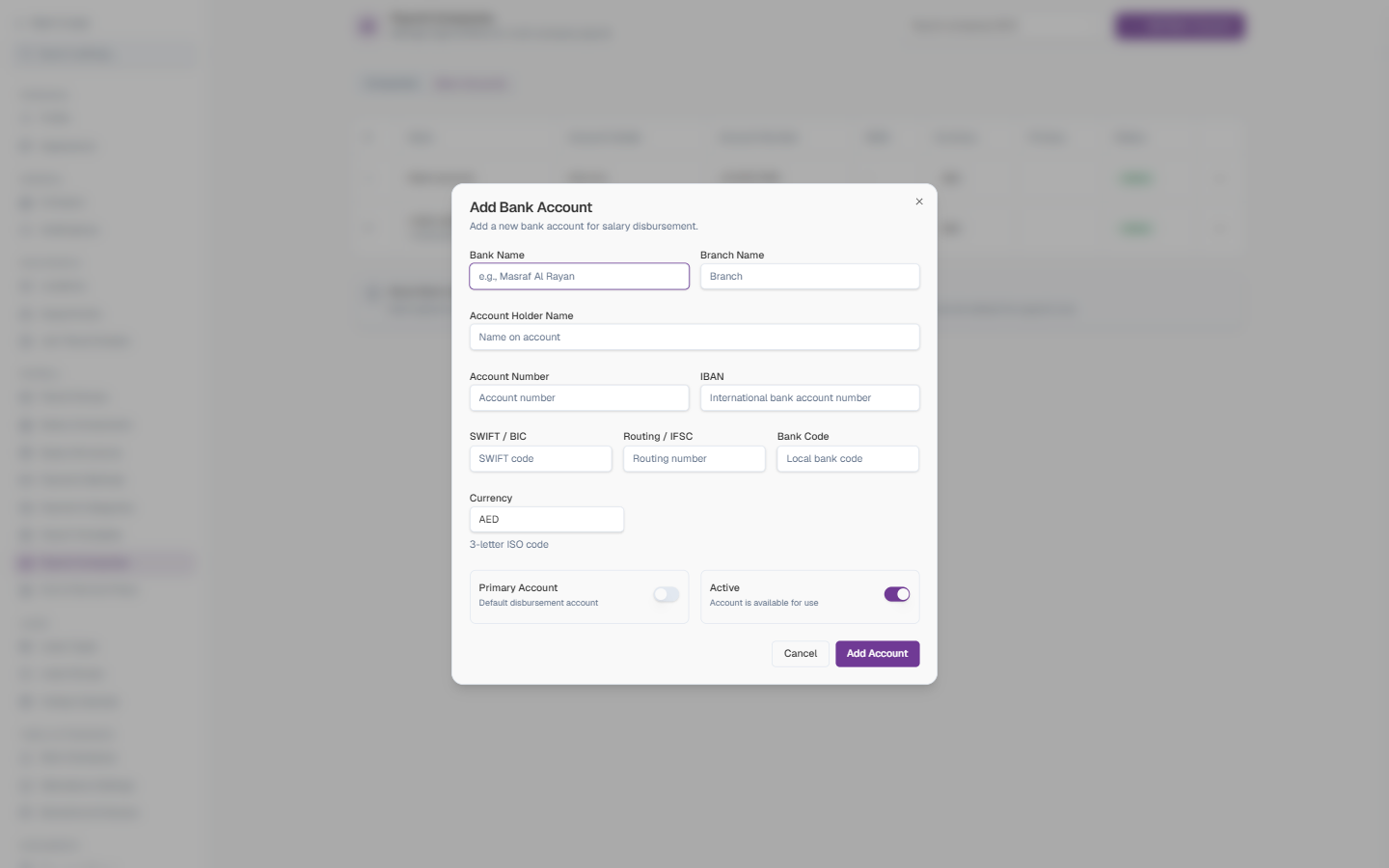
Adding a Bank Account
- On the Bank Accounts tab, pick the company from the dropdown in the top-right (e.g. Payroll companys (001)) — the list below and the new account both belong to that company
- Click Add Bank Account
- Fill in the form
- Click Add Account
Bank Account Fields
| Field | Description | Required |
|---|---|---|
| Bank Name | The bank’s name (e.g. “Masraf Al Rayan”) | Yes |
| Branch Name | The branch the account is held at | No |
| Account Holder Name | The name exactly as it appears on the account — usually the company’s legal name | Yes |
| Account Number | The bank account number | Yes |
| IBAN | International Bank Account Number, used for cross-border and WPS transfers | No |
| SWIFT / BIC | The bank’s international identifier code | No |
| Routing / IFSC | Domestic routing number (e.g. IFSC in India) | No |
| Bank Code | Local bank code, where the country uses one | No |
| Currency | 3-letter ISO code (defaults to AED) | Yes |
| Primary Account | ON: this is the default disbursement account for the company’s payroll runs. Only one account per company should be primary. | No |
| Active | ON: the account is available for use. Turn OFF to retire an account without deleting it. | No |
Mark one account as Primary to use it as the default for payroll runs. You can have multiple accounts per company for different purposes.
Multi-Company Payroll
How It Works
- Setup: Create payroll companies for each legal entity
- Assignment: Assign employees to their respective companies
- Bank Accounts: Configure bank accounts for each company
- Payroll Run: Select the company when running payroll
- Disbursement: Salaries are paid from the company’s primary bank account
Use Cases
| Scenario | Solution |
|---|---|
| Holding Company + Subsidiaries | Create a company for each subsidiary |
| Multi-Country Operations | Create companies for each country |
| Different Payment Schedules | Use companies with different payroll groups |
| Acquisitions | Add acquired entities as new companies |
Regional Considerations
United Arab Emirates (UAE)
| Requirement | Field |
|---|---|
| WPS Compliance | WPS Establishment ID |
| Ministry of Labour | MOL Establishment ID |
| Trade License | Registration Number |
India
| Requirement | Field |
|---|---|
| Income Tax | PAN, TAN |
| GST | GSTIN |
| Company Registration | CIN |
United States
| Requirement | Field |
|---|---|
| Federal Tax | EIN |
| State Registration | State ID |
Best Practices
- Use clear codes: Choose meaningful codes that reflect the entity (e.g., country + entity type)
- Complete all relevant IDs: Fill in tax IDs to enable automatic statutory reporting
- One primary account: Always designate one bank account as primary per company
- Verify bank details: Double-check IBAN and account numbers before payroll
- Document entity structure: Maintain a record of how companies relate to each other
- Regular audits: Review company details periodically for accuracy
Incorrect company registration details can lead to compliance issues and failed statutory filings. Verify all information with official documents.
How This Actually Works
Payroll Company and Payroll Group sound related — and both are required per employee — but they’re two completely independent axes, not a parent/child pair:
- Payroll Company is the legal entity (registration, tax IDs, bank accounts) an employee is employed under. Payroll Group is the pay cycle (frequency, period, payment day) they’re paid on. Nothing in the data model links a group to a specific company — a group has no company field at all.
- A single payroll run is created by picking only a Payroll Group — the “Create Payroll Run” dialog never asks for a company. That one run can include employees from multiple different Payroll Companies at once, as long as they all belong to the group you picked.
- Payroll Company only comes back into play afterward, when generating bank/WPS/SIF export files — those are filtered per company so each legal entity’s disbursement file only lists its own employees, drawn from that company’s own bank account. It doesn’t affect who gets included in the run itself, or when they get paid.
- If you have multiple legal entities that share the same pay cycle, you still need a separate Payroll Company per entity (for its own registration and bank accounts), but you likely only need one Payroll Group — don’t assume a new company requires a new group too.
Common Scenarios
“We have offices in two different countries and want separate payroll runs for each — how do I set this up?” Create a company per country on Payroll Companies, assign employees to their respective company, and set up each company’s own bank account. When running payroll, you select the company, so each country’s run is completely separate — see Multi-Company Payroll above for the full flow.