Delegation Rules
Delegation rules record that one employee should approve requests on behalf of another — useful when a manager is on leave, on a long-term assignment, or wants to share approval load.
Verified against the current build (September 2026): creating a rule here does not actually reroute approval requests. The page fully supports creating, listing, and revoking rules, but nothing in the approval/workflow engine reads these rules when deciding who a pending or new request goes to — see How This Actually Works below before relying on this page for real coverage during someone’s absence.
What you can do here:
- Create delegation rules when an approver is unavailable or wants to share workload
- Pick Temporary (date-bounded), Permanent (until revoked), or One-time (single request) delegations
- Limit the rule to specific modules, or let it cover everything
- Add a reason and optional notes for an audit trail
- Revoke rules early when the situation changes
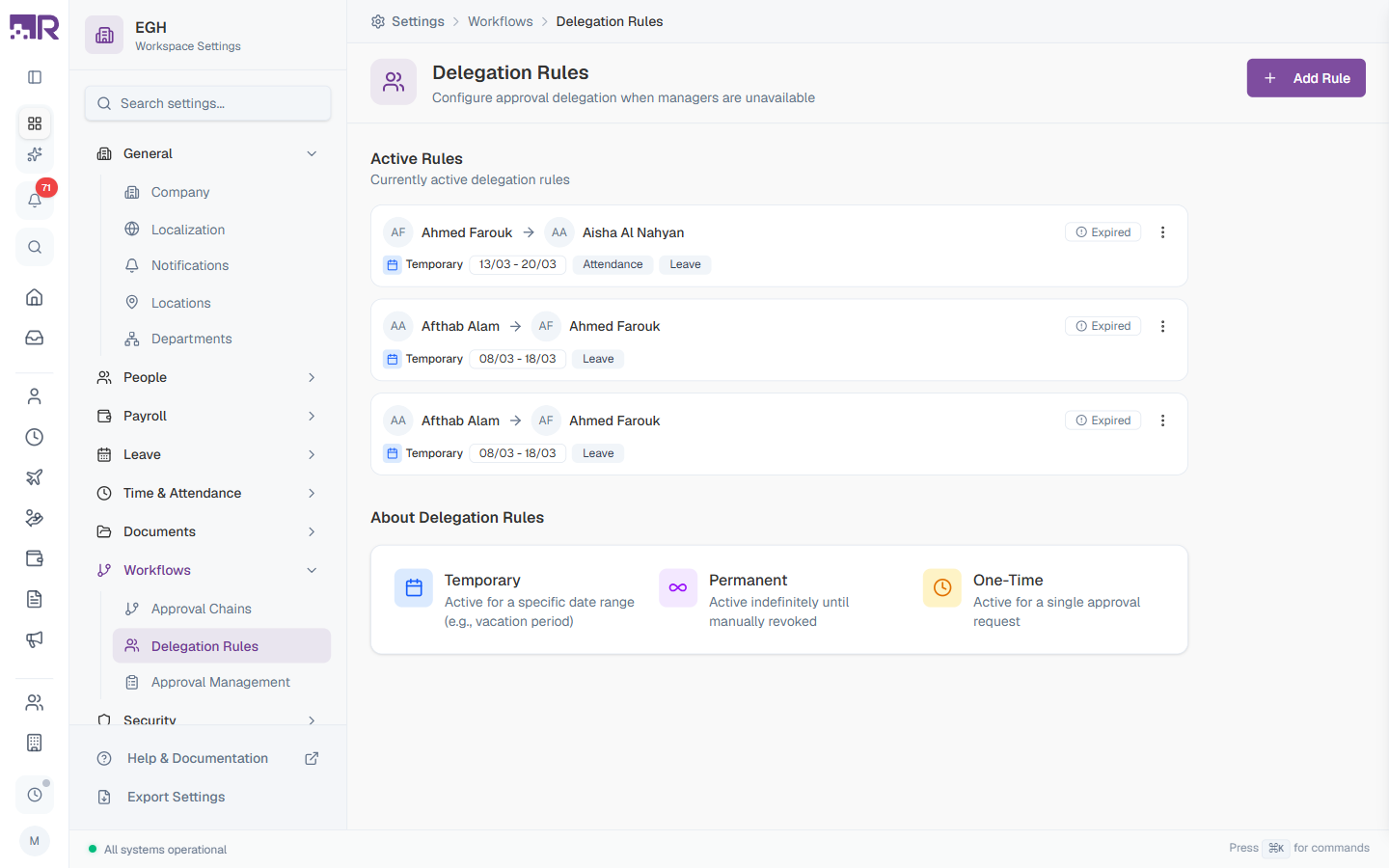
Understanding Delegation
A delegation is a temporary transfer of approval authority. (Delegation = temporarily assigning your approval authority to someone else.)
Two roles:
| Role | Description |
|---|---|
| Delegator | The original approver whose work is being delegated |
| Delegate | The person who will approve in their place |
In concept, when a request reaches a step where the delegator would normally approve and a matching active delegation exists, the delegate would receive it instead. As of the current build, this rerouting does not actually happen — see How This Actually Works below.
Delegation Types
| Type | Active when | Use case |
|---|---|---|
| Temporary | Between configured Start and End dates | Vacation coverage, short-term absence |
| Permanent | Indefinitely until manually revoked | Role changes, ongoing co-approval arrangements |
| One-time | Until the first matching request is processed, then auto-revokes | A single specific request that needs different approval |
Delegation rules are not currently processed automatically, despite what the UI implies. See How This Actually Works below.
Active Rules List
The main page shows every delegation rule that has been created. Each card displays:
| Element | Description |
|---|---|
| Delegator → Delegate | Two avatars + names showing who delegated to whom |
| Status badge | Shows Expired once a Temporary rule’s end date has passed. Rules that are currently in effect show no badge. |
| Type badge | Temporary, Permanent, or One-time with a matching icon |
| Date range | For Temporary rules, the configured Start–End range (e.g., “14-Mar - 21-Mar”) |
| Module badges | The modules the delegation covers (e.g., Attendance, Leave); none means it covers all modules |
| ⋮ menu | Opens a menu with a single Revoke action (see below) |
The About Delegation Rules card at the bottom of the page summarises the three delegation types as a quick reference.
How to Create a Delegation Rule
- Go to Settings > Workflows > Delegation Rules
- Click + Add Rule in the top-right
- Fill in the three tabs in order: People, Duration, Details
- Click Create Rule
Step 1 — People
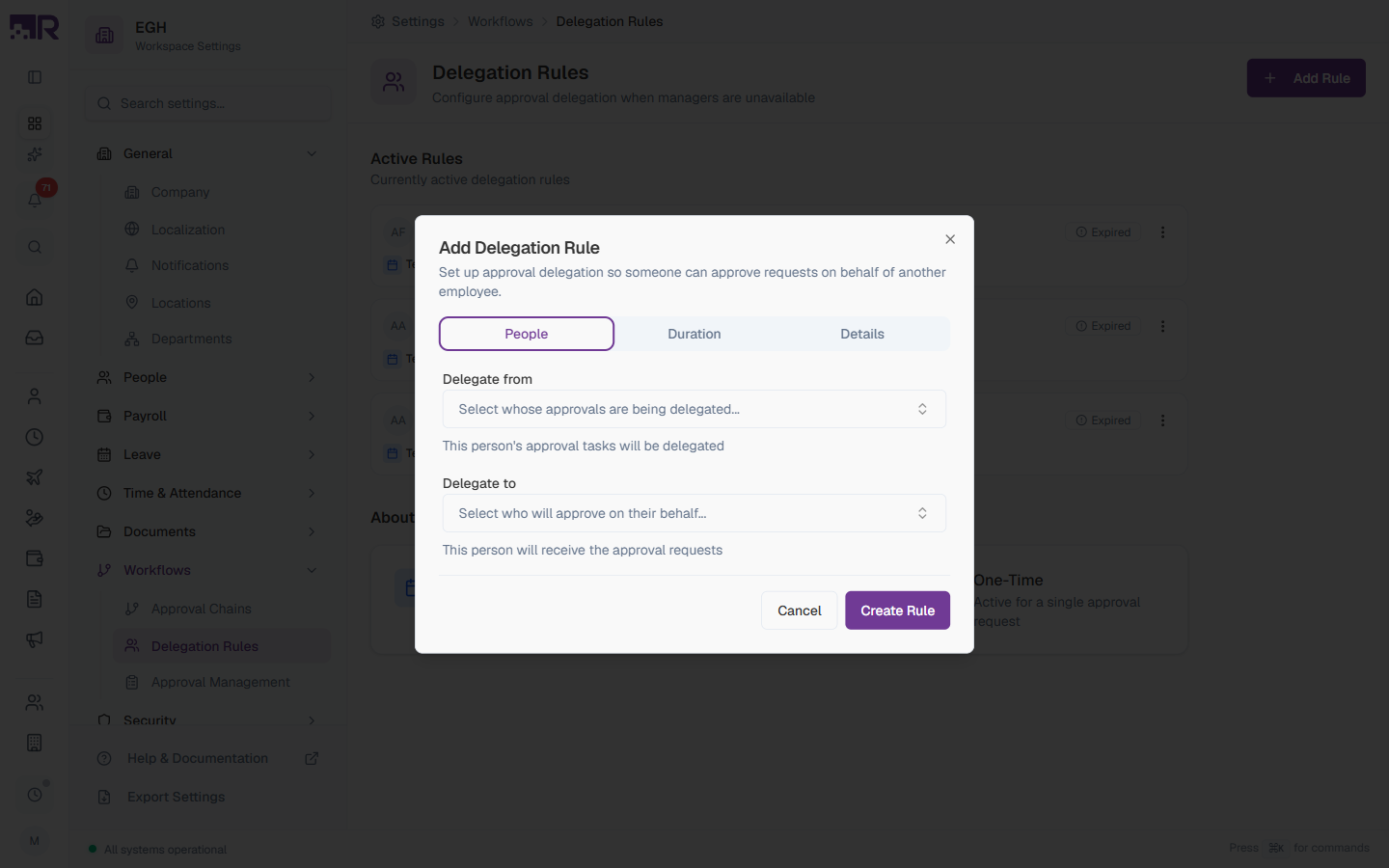
| Field | Description | Required |
|---|---|---|
| Delegate from | Pick the employee whose approval tasks will be delegated. Helper text: “This person’s approval tasks will be delegated”. | Yes |
| Delegate to | Pick the employee who will receive and act on the approval requests. Helper text: “This person will receive the approval requests”. | Yes |
Pick a delegate who has comparable authority and context to make appropriate decisions. Usually that’s a peer manager, a deputy, or the delegator’s own manager.
Step 2 — Duration
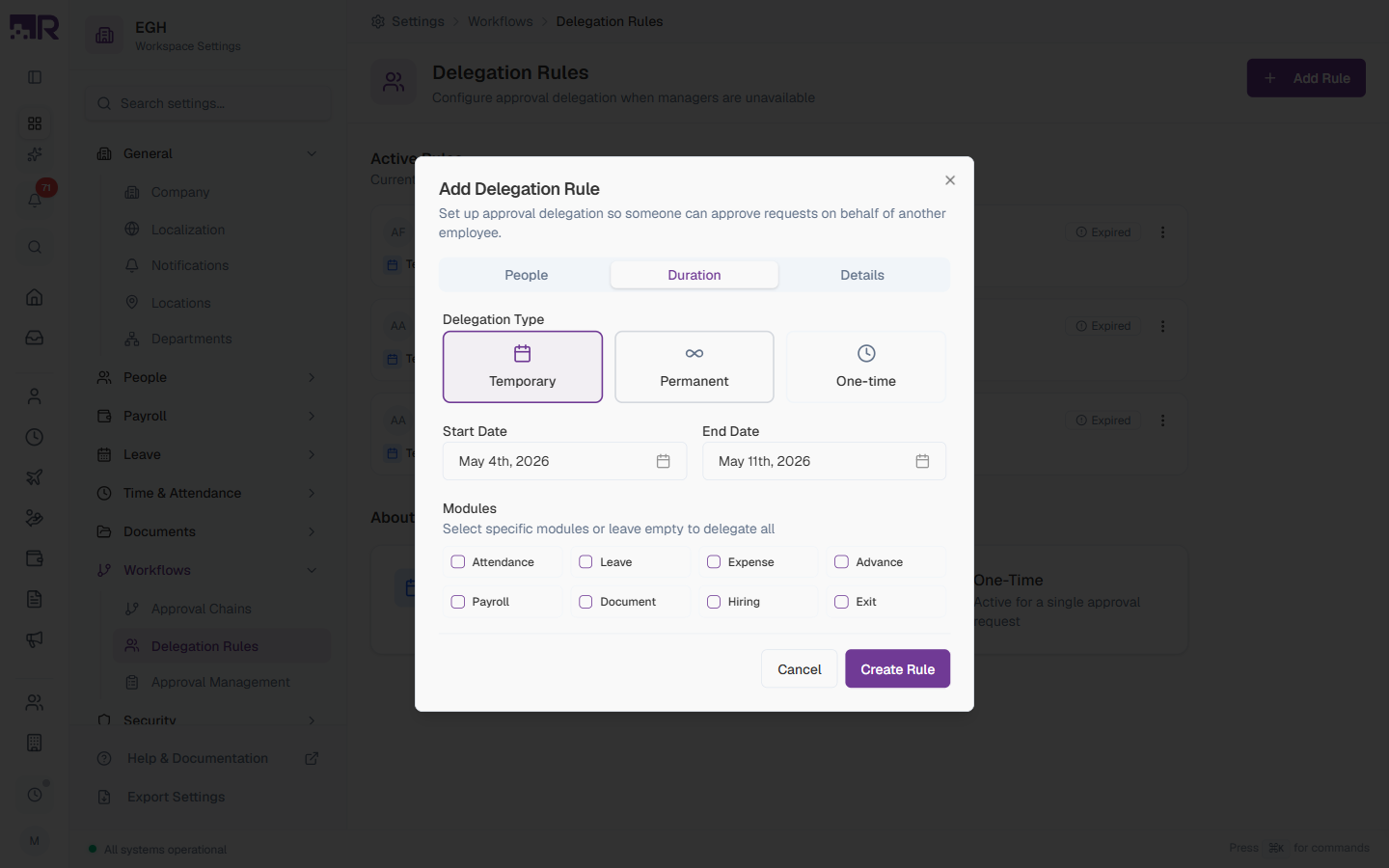
Delegation Type
Three button cards. Pick exactly one:
| Type | Behaviour | Extra fields |
|---|---|---|
| Temporary (default) | Activates on Start Date, deactivates on End Date | Start Date, End Date |
| Permanent | Stays active until manually revoked | None |
| One-time | Auto-revokes after the first matching approval is processed | None |
For Temporary delegations:
| Field | Description | Default |
|---|---|---|
| Start Date | When the delegation becomes active | Today |
| End Date | When the delegation deactivates | One week after Start |
Modules
Eight checkboxes that limit the delegation to specific modules. Helper text: “Select specific modules or leave empty to delegate all”.
| Module | Covers |
|---|---|
| Attendance | Time and attendance requests (missing punch, late exception, overtime, etc.) |
| Leave | Leave and time-off requests |
| Expense | Expense claim approvals |
| Advance | Salary advance requests |
| Payroll | Payroll-related approvals |
| Document | Document signing and review approvals |
| Hiring | Hiring requests, candidate approvals |
| Exit | Offboarding / exit clearance approvals |
Leave all checkboxes empty to delegate every module. Tick specific modules only when you want the delegate to handle only that subset.
Step 3 — Details
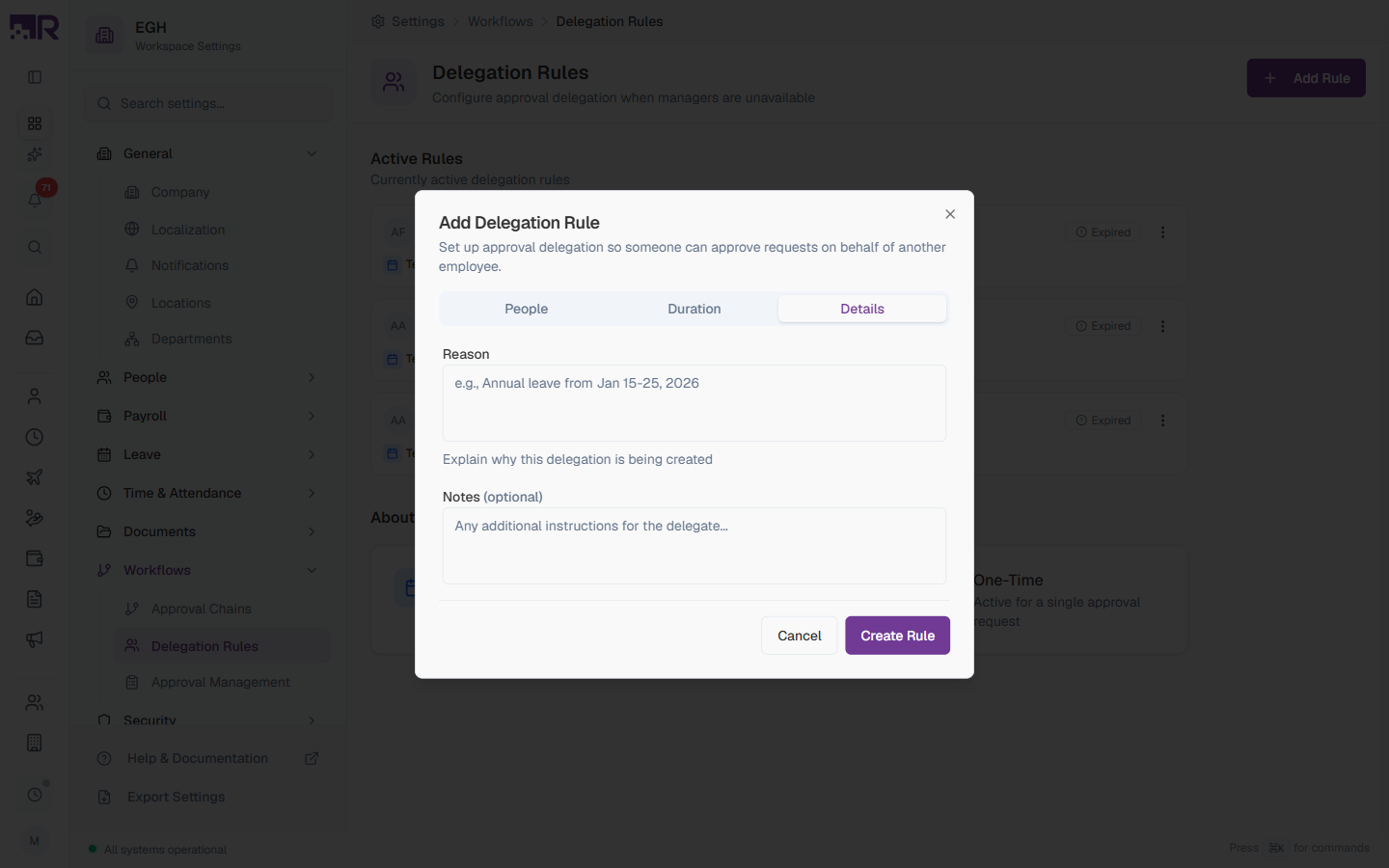
| Field | Description | Required |
|---|---|---|
| Reason | A brief explanation of why this delegation is being created. Placeholder: “e.g., Annual leave from Jan 15-25, 2026”. Used for audit and reporting. | Yes |
| Notes (optional) | Free-form additional instructions or context for the delegate (e.g., escalation guidance, special handling notes). | No |
How to Revoke a Delegation
Rules can’t be edited once created — the only action on an existing rule is Revoke. To end a rule before its scheduled end date (or to cancel a Permanent / One-time rule):
- Find the rule in the Active Rules list
- Click the ⋮ menu at the right end of the rule’s card
- Select Revoke
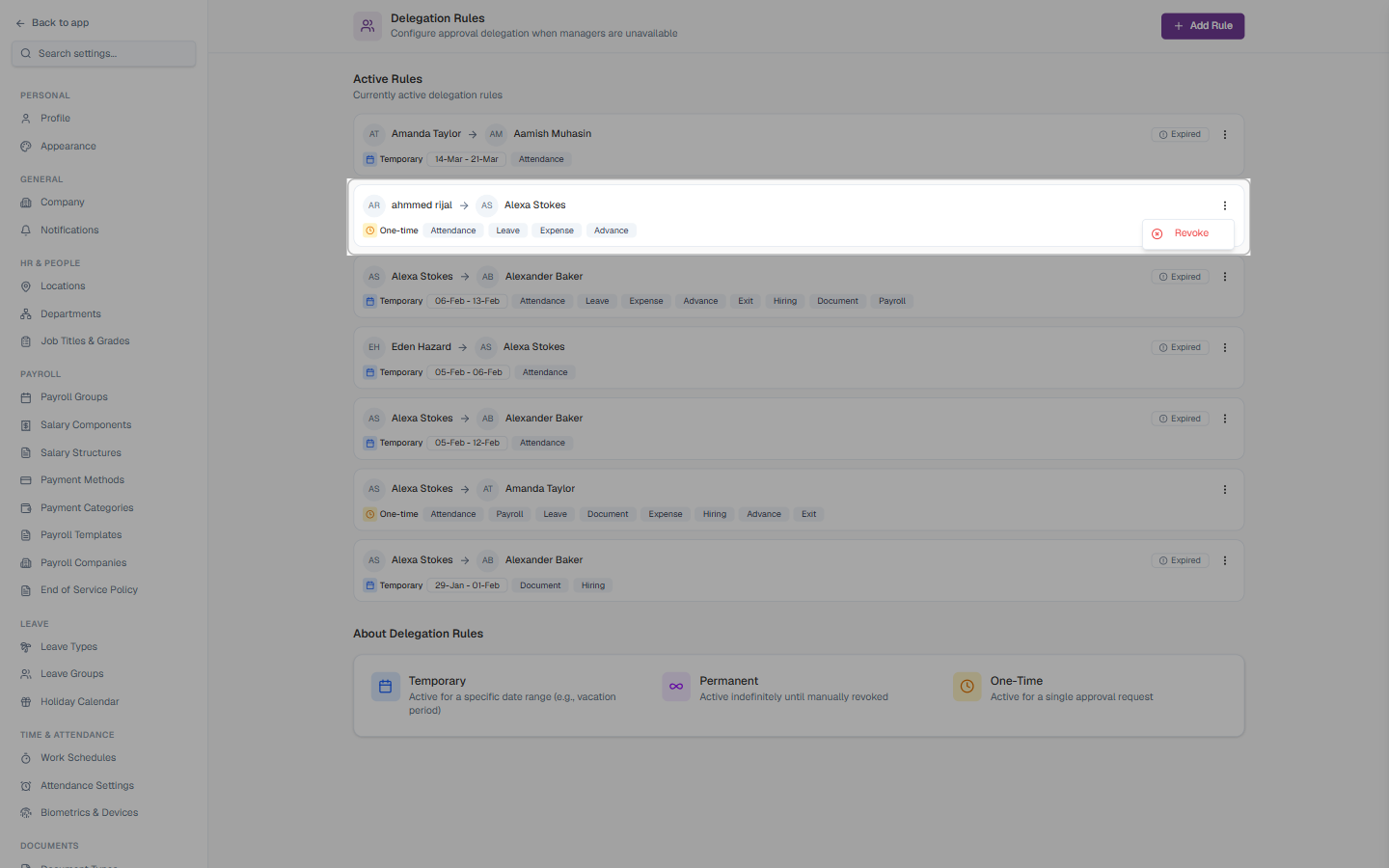
Revoking takes effect immediately in the sense that the rule stops showing as active. Since active rules don’t currently reroute pending approvals in the first place (see How This Actually Works), there’s nothing to “return” — the delegator’s queue was never actually affected.
Need to change a rule? There is no Edit option. Revoke the existing rule and create a new one with the updated people, dates, or modules. Expired rules stay in the list for audit purposes.
Common Scenarios
“Our regional manager is going on 10 days’ leave and wants someone else to approve their team’s leave requests while they’re away — how do I set that up?” Creating a Temporary delegation rule here (Delegate from the manager, Delegate to the covering person, dates matching the leave, Leave module ticked) records the intent and shows up as an active rule for that window — but it does not currently make those leave requests actually arrive in the covering person’s queue (see How This Actually Works). Until this is fixed, arrange coverage directly: have the manager keep checking their own pending approvals remotely, or have the covering person coordinate with them and act as a Specific User step / manual workaround if your process allows it — don’t assume the requests will simply show up for the delegate.
“We set up a delegation but need to change who the delegate is — how do I edit it?” You can’t edit an existing rule — there’s no Edit option, only Revoke. Revoke the current rule from its card’s ⋮ menu, then create a new rule with the correct delegate. This only changes what the Active Rules list shows; it has no effect on actual approval routing either way (see How This Actually Works).
“The person we delegated to is also going to be out during that time — can we chain the delegation to a third person?” Don’t chain them (A → B → C) — set up two separate, direct delegation rules instead: one from the original approver to whoever is actually covering, for each real gap. Chained delegations aren’t a supported pattern here per this page’s own guidance. (This is forward-looking advice for how the feature is meant to behave — see the caveat above about rerouting not currently working at all.)
How This Actually Works
- Creating, listing, and revoking rules all work exactly as this page describes — that part of the feature is real. What’s not real yet is the payoff: an active rule is not consulted anywhere in the approval/workflow engine when it decides who a pending or new request routes to. The delegator keeps receiving everything themselves, regardless of any rules pointing away from them.
- This applies to every delegation type and every module — Temporary, Permanent, and One-time rules are all stored the same way and are equally unconsulted by request routing today.
- The Active Rules list and Expired badges are accurate reflections of the stored rule, not of any real routing effect — a rule showing as currently active only means its dates say so, not that anything is being rerouted because of it.
Don’t rely on this page for actual approval coverage while someone is away. Until this is fixed, make sure the departing approver has a way to act on their own pending approvals remotely, or handle coverage through a manual, out-of-band arrangement with the covering person.
Best Practices
-
Set up delegations in advance — create the rule a day or two before the absence begins, so the record and audit trail are in place before you go (remember: this alone won’t reroute anything today — see the caveat above).
-
Inform the delegate — let them know they’ll be receiving requests, what kind, and any guidance you’d like them to follow.
-
Be specific with modules — if the delegate only needs to handle Leave during your vacation, tick only Leave. Don’t delegate Payroll or Hiring approvals unless they have authority for those.
-
Document the reason clearly — “Annual leave 15–25 Mar” is more useful in audits than “Out of office”.
-
Review permanent delegations annually — they don’t expire on their own. Audit them once a year to remove ones that are no longer needed.
-
Don’t chain delegations — if A delegates to B and B is also out, set up two separate rules (A→C and B→D) instead of relying on cascading delegations.
Delegation vs. Approval Chains
| Feature | Delegation Rules | Approval Chains |
|---|---|---|
| Purpose | Temporary transfer of approval authority | Define who should approve and in what order |
| Scope | Personal — one delegator → one delegate | Org-wide — applies to all matching requests |
| Duration | Temporary, Permanent, or One-time | Always active once published |
| Configuration | Two people + dates + modules + reason | Multiple steps, conditions, escalations, reminders |
| Who creates it | The approver (or HR on their behalf) | HR / workflow admins |
Use Delegation Rules when a specific approver is unavailable. Use Approval Chains to define your organisation’s standard approval routes.